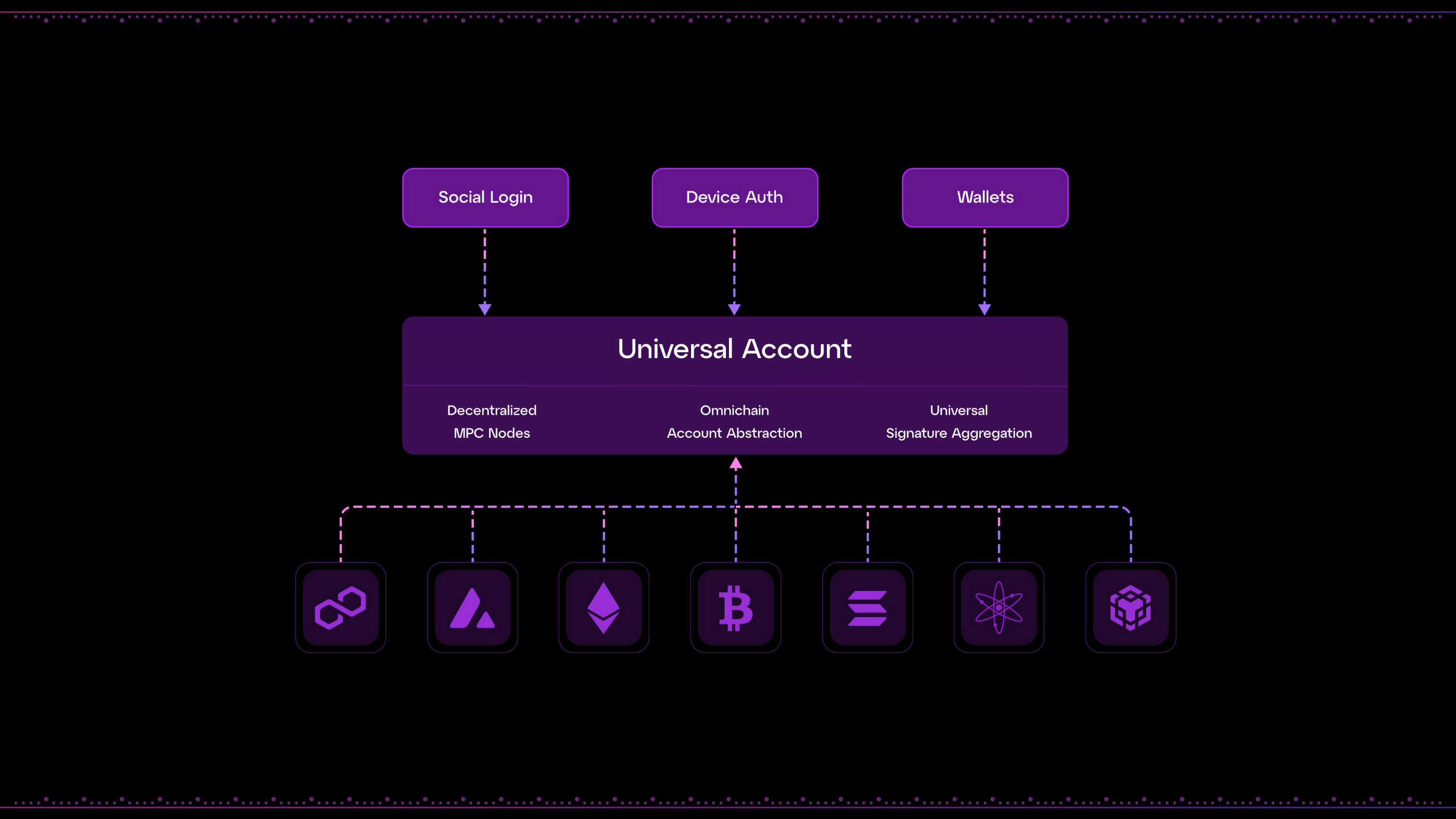
# Welcome to Our Learning Center!

<figure><img src="/files/lcymxqmXvIzv5tcIAFjW" alt=""><figcaption></figcaption></figure>

Welcome to [UniversalX](https://universalx.app), the first and only trading platform **getting the trenches paid**. Here, **you can buy and sell any token, anywhere, instantly**.&#x20;

Our Learning Center will show you how to make the most out of UniversalX. We’ll guide you through:

* **Creating a Universal Account** and funding it.
* Spotting **trading opportunities** with our built-in **Discovery** features.
* Trading **any token, anywhere**.
* **Earning rewards for trading, inviting friends, and through special mechanics like $PARTI Diamonds.**
* **Buying crypto** with cash.

…and much more.

Let’s get into the good stuff. Please select whether you'd like **more info on UniversalX's underlying technology** or would prefer **simple, straightforward user guides.**

<table data-card-size="large" data-view="cards" data-full-width="true"><thead><tr><th></th><th data-hidden data-card-target data-type="content-ref"></th><th data-hidden data-card-cover data-type="files"></th></tr></thead><tbody><tr><td><strong>Step-by-step guides</strong></td><td><a href="/pages/ggYacuyJ8EACwl4ZRSX5">/pages/ggYacuyJ8EACwl4ZRSX5</a></td><td><a href="/files/9HtoCuNXcF0XxSKQD0Oi">/files/9HtoCuNXcF0XxSKQD0Oi</a></td></tr><tr><td><strong>How UniversalX works</strong></td><td><a href="/pages/OLDoHQk98IuQOKzHA1BV">/pages/OLDoHQk98IuQOKzHA1BV</a></td><td><a href="/files/EJdn1Ae79Ru8hnjlyhMx">/files/EJdn1Ae79Ru8hnjlyhMx</a></td></tr></tbody></table>


# Depositing to Universal Accounts V2

#### Migrating to Universal Accounts V2

UniversalX has relaunched with Universal Accounts V2, a major upgrade to account performance across the platform that makes fills 5X faster.

<figure><img src="/files/yIDnsIGcGrvZSUmXopmf" alt=""><figcaption></figcaption></figure>

Migrating takes just a few minutes. To get set up:

**1. Log back in**

Log in to UniversalX using the same method and account you used before:

* Generated wallet: If you’re not automatically logged back in, you'll need to import your wallet again based on the seed you saved when you initially signed up.
* Social login: Use the same method (Google, X, or email) with the same account as you did originally. *E.g., if you used <degen@universalx.app> as your email login, make sure you use that one again.*

Once you're in, you'll have a fresh Universal Account with a new address and balance, though you’ll retain the same Diamonds you had before migration.

**2. Move your balance**

If you still hold a balance on your old Universal Account, you can transfer it directly to your new one:

1. Open Portfolio.
2. Select Send.
3. Choose the balance(s) you'd like to move.
4. Click the Wallet icon and send them to your new Universal Account.

<figure><img src="/files/4yAUmFH3Jbo0CtkNiCeB" alt=""><figcaption></figcaption></figure>

If your old account is empty, simply fund your new one:

1. Open Portfolio.
2. Select Receive.
3. Deposit any supported token on the listed chains.

<figure><img src="/files/hxmy2EmmD9M055TXFi1w" alt=""><figcaption></figcaption></figure>

**You're good to go**

Enjoy the upgrade, and happy trading.

<br>


# Creating and Funding a Universal Account

{% embed url="<https://youtu.be/eE8Dgu6OgGE>" %}

UniversalX uses a special type of account—**Universal Accounts**.&#x20;

Unlike a regular Web3 wallet, Universal Accounts let you deposit tokens from any supported chain, and use them to trade anywhere with a combined balance. To start using UniversalX, you will need to create one and fund it.

To do so:

1. **Select a signup method.** You'll be presented with two options: using a mnemonic wallet or a social account. Depending on the option you choose, you can create a Universal Account (or access an existing one) with **a Web3 wallet, a social account, a mnemonic phrase, or even just a fingerprint.** This wallet will control your Universal Account, regardless of whether you generate a new one or log into/import an existing one (in the case of mnemonic phrase wallets).

<figure><img src="/files/JT3WHe1lSGkfLgdpkkUf" alt=""><figcaption><p>Selecting an option to create a Universal Account.</p></figcaption></figure>

Once you create your account, you’ll be able to access it with the same method you used to create it. Make sure you and only you have access to this login method.

Upon logging in, you'll be prompted to enter an invite code. If you don't have one, you can skip this.<br>

2. &#x20;**Funding your account**

After successfully creating or connecting your wallet, you'll be directed to the UniversalX dashboard.&#x20;

Here, you’ll notice your account’s balance and two buttons:

<figure><img src="/files/ipu5MWc8BVISGlAyKDSW" alt=""><figcaption><p>Funding your UniversalX Universal Account.</p></figcaption></figure>

* **Receive:** Transfer cryptocurrencies from external wallets or exchanges to your Universal Account.​&#x20;

Here, you’ll see a list of supported chains, alongside two addresses: One for Solana, and another for EVM chains (every other supported chain). You can send any token on these supported chains into your Universal Account.&#x20;

{% hint style="info" %}
Note: To buy tokens on any chain on UniversalX, you need **Primary Tokens** (SOL, USDT, USDC, ETH, BNB, or BTC). If you deposit other tokens, you can sell them for Primary Tokens.
{% endhint %}

<figure><img src="https://lh7-rt.googleusercontent.com/docsz/AD_4nXcYIteQ4krVOJXFO3NsZVSDy2Gvzgf1USvp6oAyYwu0-TU3bfehD9P4etUIze6IGWGpu-omW7sG8sEQ7omew1THx07XRgpqiDtq3s1uuIZueUzq70s8bp21RMYxb4Wh6GniA9h2Sw?key=wlHA0jfqTwFPFtw8G_qznu2O" alt=""><figcaption><p>Your UniversalX address, on two different VMs.</p></figcaption></figure>

* **Add Cash:** Fund your Universal Account using traditional payment methods (**credit card, Apple Pay, Google Pay, etc.**) via a third-party integration. This is explained on the next page.

<figure><img src="https://lh7-rt.googleusercontent.com/docsz/AD_4nXfG_AV8IK5bRJEOVDU40Jp4e-4E00CZ94jIRIWiJRWiVGhAWZI_AT3HFj4aU7MsRyIMYUlmi9nwHJ6hWg4UF64otViIEZ44b6SkRBy0XSOqEp7ESvs5oHd24cVt04iqFI225q9HDg?key=wlHA0jfqTwFPFtw8G_qznu2O" alt=""><figcaption><p>Purchasing crypto with cash through UniversalX.</p></figcaption></figure>


# Don’t Have Crypto? Buying with Cash

{% embed url="<https://youtu.be/-WLV7DwqAGs>" %}

UniversalX lets you buy tokens directly using cash through its integration with third-party onramp providers. You can do this with debit or credit cards, Apple Pay, and Google Pay.&#x20;

**To buy crypto with cash on UniversalX:**

1. In your **Home** or **Account** screen, click “**Add Cash**”.

<figure><img src="/files/SN71j6xeAyjx4QIWxW5J" alt=""><figcaption><p>You can find the "Add Cash" button in two different UniversalX sections.</p></figcaption></figure>

2. **Specify your purchase details:**

* Enter the amount of cash (e.g., USD) you wish to spend.
* The system will pre-select the most convenient receiving option for you (e.g., USDC on Arbitrum).

<figure><img src="https://lh7-rt.googleusercontent.com/docsz/AD_4nXdJN8UVmQLSdL71N5xhKFMogdhD0Cq0-nTlOj8PBK8lji9L2cqF_yPjYIrYt8j7tHEEDUFAGzKWWLGks8jCvkVV5P7SaqT_evGdgftnupS1jTXWLCVCf0nUQV4zlA4ynkMqsU1klQ?key=wlHA0jfqTwFPFtw8G_qznu2O" alt=""><figcaption><p>Specifying your desired purchase to buy crypto with cash.</p></figcaption></figure>

3. &#x20;**Confirm and proceed**

* Review the displayed conversion rate and the amount you'll receive. The onramp provider will take a fee for their services.
* Click "Buy" to continue.<br>

4. **Choose your payment method and complete the purchase.**

* Select your preferred payment option:
* Google Pay/ApplePay.
* Credit or debit card (Visa/Mastercard).
* Confirm your choice, enter any necessary information, and click the respective payment option button. Follow any prompts to finalize your payment.
* After completing the payment, your tokens will be credited directly to your Universal Account balance. This may take between 30 minutes and an hour in some cases.

<figure><img src="https://lh7-rt.googleusercontent.com/docsz/AD_4nXcYarrK3c1gigju3z8prG6XZizLflX03Mv4wFnW1pD2sLPR2LiCM1_3v3wR8_lByIHKie9f-iImI1_kFPhiD-vVs-O--kspXw4cjimjsTk6dCEhUx1YqFYAchsuTCGMO5K6DwTJsg?key=wlHA0jfqTwFPFtw8G_qznu2O" alt=""><figcaption><p>Selecting a payment method to buy crypto with cash.</p></figcaption></figure>

<br>


# Showing You Around: Your Dashboard

{% embed url="<https://youtu.be/8VJhGnBHXsQ>" %}

Upon logging in, you'll land on your dashboard, aka the Discover page.&#x20;

Here you’ll find:

* **Account overview:** Check your balance, 24-hour PNL, send tokens, or buy crypto with cash.
* **Announcements:** The latest news and features on UniversalX.
* **Token discovery:** A curated token list allowing you to find new and existing tokens based on their performance, as well as examine their price action and other data.
* **Chain selector:** Filter tokens by ecosystems or view the entire market.<br>

<figure><img src="/files/kdIG66ijNgKr3gUWe1k2" alt=""><figcaption><p>The UniversalX dashboard.</p></figcaption></figure>

On the top bar, you’ll also notice four buttons, taking you to UniversalX’s main functionalities:

* **Home:** The page you’re currently at, with all the options described above. This is your starting line for everyday degen activity.
* **Trade:** UniversalX’s main trading interface.
* **Earn:** Displays different options through which you can earn rewards.
* **Invite:** A place for you to manage and earn rewards for inviting friends to UniversalX.
* **Stake:** This page will allow you to stake $PARTI to passively grow your holdings.
* **Wallet:** Manage and view your assets, PNL, and trading activity.

You may also see additional options displayed, depending on whether there are any active campaigns or special activations in progress at the time.

<figure><img src="/files/8kv6Se5J0nhltxB7nlo0" alt=""><figcaption><p>The main UniversalX pages. Next to them, depending on whether there are active campaigns, you may also see additional buttons.</p></figcaption></figure>

We’ll go through each of these sections further down the guide.&#x20;

But for now, we’ll stick to the **Home page** and explore the **Discovery** panel.


# Home & Spotting Trading Opportunities

{% embed url="<https://youtu.be/3pY0f5l9Ows>" %}

UniversalX is designed to let you discover opportunities as soon as you launch the app.

The **Home page** is where the action happens. It features data such as tokens’ prices, 24-hour movements, and market caps.

It also lets you view the market through different lenses via your **Favorite Tokens**, the **Radar**, market **Highlights**, and different **Categories**. You may also choose to select to discover tokens on a specific chain using the **Chain selector.**

### Favorite Tokens

Got tokens you're eyeing? Add them to your favorites for easy tracking:

* On a token's trading page, click the star next to its name. That’s all. It's now in your **Favorites** list.

<figure><img src="/files/zCGxZlLD68jfwxwgVr0t" alt=""><figcaption><p>Adding a token to your favorites.</p></figcaption></figure>

### Real-Time Insights: The Radar

The Radar automatically finds and aggregates notable tokens across all chains.

With it, you can catch the following at a glance:

* **Time Frames:** Token activity over 1 minute, 5 minutes, 1 hour, 4 hours, or 24 hours.
* **Key Metrics:** Vital stats like token age, liquidity, and holder distribution.
* **Filters:** You can view tokens through three different perspectives:
  * **New tokens:** The newest of the newest—ideal for early birds.
  * **Blooming tokens:** Coins gaining momentum. Not completely new, but growing fast.
  * **Thriving tokens:** Established and performing well.

<figure><img src="/files/nyA7TjIIf0yAznVR193V" alt=""><figcaption><p>The Radar—one of UniversalX’s star functions.</p></figcaption></figure>

{% hint style="warning" %}
**What if I don’t want to get rugged?**

While exploring, you might notice some tokens with a ⛊ symbol. This indicates a security alert. To better understand what triggered it:

* 1\. Click on the token to visit its trading page.
* 2\. Click "Info" to get detailed insights to decide whether you want to continue considering this token or discard it altogether.

Note: Our security features are automatic and, as such, do not constitute an opinion or definitive judgment on any token. They’re just here to let you know we’ve found something potentially dangerous. DYOR!
{% endhint %}

<figure><img src="/files/X1YBgAgEgp1adwv4VBta" alt=""><figcaption><p>Depending on what kind of tokens you’re surveiling, it may be easier or harder to encounter tokens marked as suspicious.</p></figcaption></figure>

### Crypto at a glance: Highlights

The **Highlights** section is your cheat sheet for the market’s latest moves. You can use it to stay up to date, or to not lose yourself in the details of the day’s most recent action.

Within it, you can find:

* **Top gainers & losers:** The biggest price movers in the last 24 hours.
* **Trending tokens:** The most searched and actively traded tokens.
* **New:** A quick breakdown of new tokens and their activity.

<figure><img src="https://lh7-rt.googleusercontent.com/docsz/AD_4nXdYQMV6sfxslU8ov-xPTVmDtQNLJYaei5yAaHiyu0yLERMFJfBunxYuoZL2i8F6452jUErD0hI2lXtms3VPVXa-crSz-nX7FntGrPeYYZn0fKsNphINoWp-ctONIs8SXd7CVN3h?key=wlHA0jfqTwFPFtw8G_qznu2O" alt=""><figcaption><p>The entire crypto market at a glance, shown on the Highlights page.</p></figcaption></figure>

### Categories: Segment your discovery

In the **Categories** feature, you can organize and filter tokens based on their niche or common attributes. Some of the available options are:

* **Sector:** Filter tokens by their project type or platform. This includes categories like L1s, L2s, Memes, Stablecoins, DEX, Infrastructure, etc. This allows you to focus on specific sectors that match your value investment strategy.
* **Portfolio picks:** Access curated lists of tokens backed or highlighted by prominent Venture Capital firms and labs.&#x20;
* **Niche:** Dive into specialized categories such as Virtuals, AI Agents, indexed projects, and more.&#x20;

<figure><img src="/files/dcAEbr098QnCiuTgocvP" alt=""><figcaption><p>Different categories and niches on UniversalX.</p></figcaption></figure>

### Binance Alpha: Highlighted by the world’s biggest CEX

You can also view tokens highlighted by **Binance Alpha**, offering insights into these tokens’ performance.

<figure><img src="https://lh7-rt.googleusercontent.com/docsz/AD_4nXc5tUkzOn6PdsSF6IVG7ysfcweZMY2oF_gJ4QigHZOz8IW2kwg8-JU-qom3tkTDwgL-8Dy4O3Ldyw0OOjs_uZXOR5tpte5u3Jn7Kny8qJAImukH9JayR9v1-Z36b8Mx2QxqNfiV?key=wlHA0jfqTwFPFtw8G_qznu2O" alt=""><figcaption><p>Binance Alpha tokens view.</p></figcaption></figure>

### xStocks: Tokenized equities

Lastly, you can trade xStocks equities through our dedicated tab. This means, in practice, you can also use UniversalX to access stock trading opportunities!

<figure><img src="/files/h5xvSQSKu8rF0zigMurJ" alt=""><figcaption><p>xStocks on UniversalX.</p></figcaption></figure>


# Trade: Buy & Sell Tokens on Any Chain

{% embed url="<https://youtu.be/19K3TPK9IeM>" %}

UniversalX's **Trade page** offers a professional and customizable trading interface, with real-time data on every asset’s movements. Here, you can buy and sell tokens from any chain, and make decisions based on real-time on-chain data.

Here's a quick guide to navigating and using its features:​

### Trading interface&#x20;

The **Trade page** is divided into three panels, each allowing you to make decisions or obtain information about an asset. These are:

* **The About (information) panel:** Analyze a tokens’ holders, distribution, security information, and more.
* **Trading chart:** View and analyze a tokens’ activity over time in an interactive chart.
* **Execution panel:** Buy and sell tokens from any chain and view your asset balance.

<figure><img src="/files/oHEIfgBv5xcAW2DUz2rk" alt=""><figcaption><p>Your UniversalX trading interface.</p></figcaption></figure>

### About panel

The **About panel** feeds you with quantitative and qualitative data to make informed trading decisions. Some of its features include:​

* **Security concerns:** Highlights tokens with potential security issues, helping you spot red flags.​
* **DEX Liquidity Pools:** Information about the token's liquidity across various decentralized exchanges, offering insights into trading feasibility and potential slippage.​
* **CEX listings:** Whether the token is listed on centralized exchanges.
* **Social media presence:** Links to the token's official social media channels.
* **Informational summary:** A concise overview of the token, its purpose, use case, and key features, aiding in quick understanding.​

<figure><img src="/files/u34JuPJcBn7eMyBv7ReI" alt=""><figcaption><p>The About panel's risk assessment of a token.</p></figcaption></figure>

### Trading chart

This TradingView-powered chart is fully customizable and provides professional-grade analysis tools, such as:

* **Timeframe adjustments:** Switch between 1-minute, 15-minute, 1-hour, 4-hour, daily, and weekly charts.
* **Candlestick & line charts:** Choose different chart types based on preference.
* **Volume & market data:** View historical trends and liquidity movements in real-time.
* **Technical indicators:** Customize charts with SMA, RSI, Bollinger Bands, and other indicators for deeper analysis.
* **Holder Bubblemaps:** Understand a token’s holders' distribution at a glance.
* **Buy & Sell indicators:** Tracking at what points you bought or sold a token, as well as your average entry price.

<figure><img src="/files/Z2SgQeouBbukU7VctNI5" alt=""><figcaption><p>Interactive trading charts on UniversalX.</p></figcaption></figure>

### Execution panel

This panel is displayed on the **Trading page** for any token. From here, you can trigger any trade.

Depending on whether you’re buying or selling a token, this panel will display:

* **If you’re buying**, it will show your **Primary Token** balance (your combined balance of BNB, BTC, ETH, USDC, USDT, and SOL, which you can use to buy in one click) across all chains.
* **If you’re selling**, it will display your token balance for the token you want to sell.

{% hint style="success" %}
Remember: When buying on UniversalX, your token balance is unified, meaning all Primary Tokens across different chains are aggregated together. This allows you to spend tokens from multiple chains without bridging.
{% endhint %}

Below this, you will also be able to see your balance of other tokens in your **Universal Account**.

To trade on UniversalX:

1. **Choose a trade type:** Select whether you want to Buy or Sell using the toggle at the top.
2. **Enter an amount:** Input how much you want to trade or use quick-select buttons (dollar amounts for purchases, percentages for sales).
3. **Confirm and Execute:** Click “Buy” or “Sell” to complete the trade instantly.

<figure><img src="/files/hubziIYcKXLzDeHwDlHi" alt=""><figcaption><p>Purchasing tokens on UniversalX.</p></figcaption></figure>


# Advanced Trading: Limits, TP/SL & TWAPs

With UniversalX, you can also execute more complex trading operations, 100% onchain. These include:<br>

* Limit orders
* Take-Profit/Stop-Loss operations
* TWAP orders<br>

Below, you can find a breakdown of these functionalities:

### 1. Limit Orders

A **limit order** lets you specify the exact price at which you’re willing to buy or sell a token.\
\
Your transaction will only be executed once that price becomes available in the pool.

#### To create a limit order:

1. Open the **Trade** screen for any token.
2. Within **Buy** or **Sell**, select the **Limit** tab.
3. Fill in:
   * **Limit Price** – The price at which you want to buy or sell the token.
   * **Amount** – How much of the token you'd like to trade (you can also use the quick‑select buttons to set this).
4. *(Optional)* Attach TP/SL presets (see section 2).
5. Press **Buy / Sell.**

After this, you can find your order under your **History** at the bottom of the **Execution panel.**

<figure><img src="/files/VHNUqXkzLLKMA79dYdjx" alt=""><figcaption><p>Setting up a limit order.</p></figcaption></figure>

***

### 2. Take‑Profit & Stop‑Loss (TP/SL)

**TP/SL** lets you automate exits at predefined profit or loss levels.\
UniversalX supports:

| Type                 | Field              | Description                                                   |
| -------------------- | ------------------ | ------------------------------------------------------------- |
| **TP (Take‑Profit)** | *PnL %* or *Price* | Closes a slice of the position once the selected gain is hit. |
| **SL (Stop‑Loss)**   | *PnL %* or *Price* | Closes a slice if the loss threshold is breached.             |

You can also stack several legs of these (up to 4 TPs and 4 SLs) to ladder out of a position gradually.

**To set up a Take-Profit or Stop-Loss strategy:**<br>

1. **Summon the TP/SL modal.** Within the **Execution panel**, select TP/SL.
2. **Edit a preset or create one.** You'll see the tabs **P1‑P4**. These are trading presets. You can either edit the pre-selected one or create a new one by hitting **“+”.**
3. **Define your exit legs.** Fill up the following fields:

| Field                    | What it means                     | Example                                         |
| ------------------------ | --------------------------------- | ----------------------------------------------- |
| **Sell %**               | How much of the position to close | `50` → half the size                            |
| **PnL %** (or **Price**) | Profit or loss trigger            | `+100` (double your money) for TP, `‑50` for SL |

\
You can also add multiple legs to your strategy to ladder your approach.

4. **Execute your trade once you're ready.**

<figure><img src="/files/3vM96pYlHqj8MAIq9Ym8" alt=""><figcaption><p>Setting up TPs and SLs.</p></figcaption></figure>

***

### 3. TWAP (Time‑Weighted Average Price) Orders

A **TWAP** splits a large order into equal-sized child orders sent at fixed intervals. This reduces market impact and helps you track the average price of the range.

**To place a TWAP order:**

1. Choose **Market | Limit | TWAP** → **TWAP**.
2. Set an **Interval (Intv.)** – e.g. every 5 minutes.
3. Fill out **Split to** – i.e. the number of trades required to fill your order.
4. Enter your total trading **Amount.**
5. **Confirm.** Your order is now sent and will execute even if you close UniversalX.

After this, you can find your TWAP order under your **History** at the bottom of the **Execution panel.**

<figure><img src="/files/GeTI6RSidwy70Ur0bMQR" alt=""><figcaption><p>Using TWAPs on UniversalX.</p></figcaption></figure>

***

### 4. Preset Strategies (P‑slots & S‑slots)

Beyond one‑off orders, UniversalX also offers dedicated slots to **save full strategies.**&#x20;

You can select between setting up **presets** and **strategies**:

| Slot group     | Purpose                                                |
| -------------- | ------------------------------------------------------ |
| **Presets**    | Parameter templates (leverage, slippage, MEV, expiry). |
| **Strategies** | Full TP/SL blueprints.                                 |

You can predefine up to four trading settings to quickly apply them when trading. \
\
**To create a preset:**

1. **Locate** the Presets and Strategies bar at the top of the **Execution panel**.
2. Press **+** next to an empty P or S slot.
3. Configure your strategy or preset by filling out their parameters. **Remember that every preset has a Buying and a Selling component**, so you'll need to fill out both.
4. Give it a descriptive name and **Confirm**.
5. **Select it any time** you'd like to use it for a trade.

<figure><img src="/files/Da1tCg1NLUvgJjjFk0oK" alt=""><figcaption><p>Setting up strategies.</p></figcaption></figure>

***


# Customizing Your Trading Screen

{% embed url="<https://youtu.be/FANtdcNtBSk>" %}

UniversalX also allows you to adjust the trading interface and the app as a whole. You can do this in two ways:

**You can customize your UniversalX experience by:**

* Going to UniversalX’s **Settings** by clicking the three dots next to your balance.
* Under **Preferences**, you will find three options:
  * **Language**.
  * **Chart Color**, with two color sets that can be interchanged for up and down patterns.
  * **Theme**, to select between dark and light mode.

<figure><img src="https://lh7-rt.googleusercontent.com/docsz/AD_4nXdoGAaKIirtYqN3lXKoV0P7F_ROrr-erTF98e_y71LRKHugEDr0UbQcq3hywBhJXQav1qqYraoZdoUDn6IhUds-LSwi3Ud47DLzjNzk2bF45jAikalA5HoWs-5FXQ4Ibwv1xadY?key=wlHA0jfqTwFPFtw8G_qznu2O" alt="" width="375"><figcaption><p>Customization settings on UniversalX.</p></figcaption></figure>

Above the **Execution panel**, you will also find four buttons, which you can use to customize your trading screen directly. Respectively, these are:

* **Multi-chart mode:** Allows you to view all the tokens you have selected on one screen. These tokens are also visible as tabs over the **About panel**.
* **Full-screen mode:** View your chart(s) in full screen.
* **Close tabs:** Focus only on the first token in your list, and erase all others.
* **Token search:** Quickly search for additional tokens to view. If you’re not in multi-chart mode, your selected token will appear on your screen, and the one you were viewing previously will remain as a tab.

<figure><img src="/files/BunAswl9kmSeyJtIm5jS" alt=""><figcaption><p>Different buttons enabling the multi-chart mode.</p></figcaption></figure>


# Trading Settings: Slippage, MEV Protection & Primary Tokens

{% embed url="<https://youtu.be/m8zagbHz-e8>" %}

Advanced traders can also access additional settings to customize their trading.&#x20;

To access **Trading Settings**, click on the gear button over the **Execution Panel**. There, you’ll find the following options:

* **Skip preview:** Toggle Off/On to enable or disable trade confirmation previews.
* **Value loss warning:** Set a percentage threshold (e.g., 20%) to receive alerts if a trade incurs excessive slippage. This is particularly important to set up if you turn off confirmation previews.
* **PnL (Profit and Loss) calculation:** Choose between **Position-based** or **All** (aggregated) profit-and-loss tracking. This will decide whether your **PnL** resets after fully closing out a position or whether a statement carries over to future positions.
* **Universal Gas:** Uses **$PARTI** as the default gas token on all your UniversalX transactions.
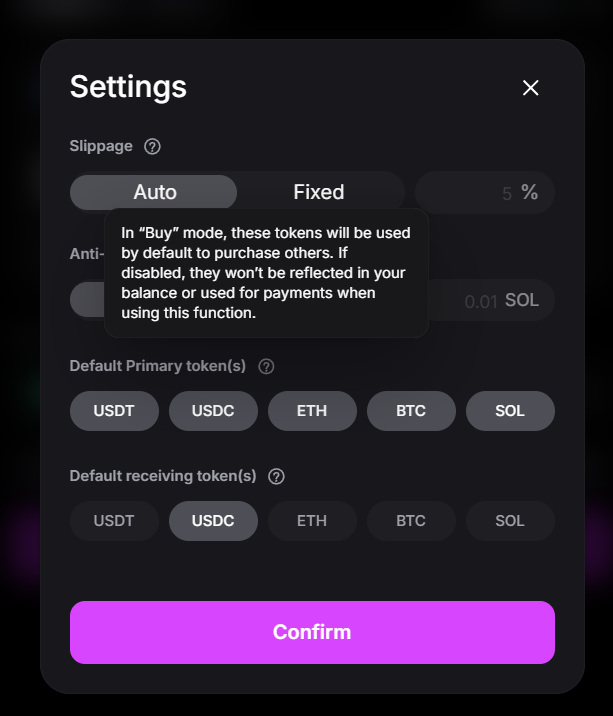
* **Default Primary Tokens:** Select which tokens (USDC, USDT, SOL, ETH, BTC, BNB) to prioritize for transactions. If you toggle off a token, it will not be used in future transactions or counted in your balance, even if you hold it. (***NOTE: This function is currently unavailable; it will eventually be reinstated.***)
* **Custom buy amounts:** Edit the preset purchase values that are shown in your **Buy** screen.
* **Custom sell percentage:** Edit the preset sale percentages that are shown then selling through the **Execution panel**.
* **Slippage control:** Select **Auto** for dynamic adjustments or **Fixed** to set a custom percentage (e.g., 5%).
* **Anti-MEV Protection (Solana)**: UniversalX offers default protection for EVM trades but, given the way Solana trades work, if you want to reduce the risk of sandwich attacks when trading on Solana, you can turn MEV protection on and off. You can also specify how much you want to pay to validators to prioritize your trade. The more you pay, the higher your protection will be.&#x20;

Once you’ve adjusted your settings, click "**Confirm**" to save and apply changes instantly.

<figure><img src="https://lh7-rt.googleusercontent.com/docsz/AD_4nXdk1dhopSKvaAFy-P6fr9mjhX4ZqNWf-_QOrRLBKQqKEIHK1FaMffp9Q1FWqb_XUkpjv5Q8tPaF5Ab-aC6nVWpSBgLhj7hsqGhwwm1J2BgaKtafvV47ugakOxnP0Tah-3TOI2Xhag?key=wlHA0jfqTwFPFtw8G_qznu2O" alt=""><figcaption><p>Settings screen on UniversalX.</p></figcaption></figure>


# Wallet: Your Universal Portfolio

{% embed url="<https://youtu.be/dlrfIiX63s8>" %}

As mentioned, UniversalX relies on **Universal Accounts** to facilitate the experience of trading with one account and one balance on any chain.

Within the **Wallet page**, you can manage your Universal Accounts’ assets across all chains, track their performance, and execute essential actions—such as sending and receiving, as well as access inviting features.

Here's a breakdown of what you can do on this page:

### Balance and key functions

At the top, you'll find your **Universal Account balance**, which aggregates funds across all supported chains—as well as its 24H performance.&#x20;

Below it, you will also find a panel displaying your **token balances** and **Activity**.

<figure><img src="/files/CtenGJ36J9RYrHXxUCF9" alt=""><figcaption><p>Assets balance and activity.</p></figcaption></figure>

Furthermore, underneath your balance, you’ll find buttons to access the following functionalities:

* **Send tokens:** Transfer tokens to another address. Here, you’ll be able to select the receiving chain as well.&#x20;

<figure><img src="https://lh7-rt.googleusercontent.com/docsz/AD_4nXfBPj7MlXLjFU_O-VZHUvyJd9v4kxVHhwxk8lz2VE-6ZUQfa33HLUAEK4mJvM12n4eHrJTveNP3RLg453Z4CfI5hSXLH3cnr19JoX2aUPxjtsnWFWq4cwVPYBJ4PZy3zoX9tSPrSQ?key=wlHA0jfqTwFPFtw8G_qznu2O" alt=""><figcaption><p>Sending tokens.</p></figcaption></figure>

* **Receive tokens:** Get your two deposit address for receiving funds. Within UniversalX you have two addresses—one for EVM chains, and one for Solana.

<figure><img src="https://lh7-rt.googleusercontent.com/docsz/AD_4nXf4bE7LnGlg1EDgXje2fFRmPny-XQNHLJAZA2Nm6EaXFQXaMldn_F_tG8lfzDoVKpDqx0qcRMwgM1-nN4e2PxswZgY0bckuw55KzXtyKikeFoCNdQHDnTOyDiG5Q39G73PoxVnK?key=wlHA0jfqTwFPFtw8G_qznu2O" alt=""><figcaption><p>Your Universal Account's addresses.</p></figcaption></figure>

* **Trade:** Go to the **Trade page**.
* **Convert:** Swap across Primary Tokens on multiple chains. Here, you can even select to swap multiple tokens into a single one, allowing you to quickly consolidate your balances.

<figure><img src="/files/qgMrDM3NTeMbX3D70y9C" alt="" width="437"><figcaption><p>Converting several Primary Tokens in one click.</p></figcaption></figure>

* **Add Cash/Cash Out:** Deposit or withdraw fiat into an external account.
* **Red Packet:** Access the Red Packet function, which is covered on the Invite chapter.
* **Invite:** Refer friends to UniversalX.

### Performance, allocations and distribution

The panel on the right also gives you a visual overview of your **Balance, PnL, Portfolio, and token Allocation**. These feature:

* **Balance graph:** Displays total account value trends over different timeframes (1D, 1W, 1M, 3M, 6M).
* **PnL (Profit & Loss):** Tracks realized and unrealized gains/losses.
* **Portfolio:** Provides a visual breakdown of your token holdings.
* **Allocation:** Visual representation of the chains your assets are distributed on.

<figure><img src="/files/idGgXRZUnbf5LLVaN1kZ" alt=""><figcaption><p>Your portfolio's performance, allocations and distribution.</p></figcaption></figure>


# Invite: Earn & Grow UniversalX

UniversalX’s Invite program allows you to earn commissions by referring friends. **You can collect up to 50 % of the fees your friends generate**.

This page will guide you through the different dynamics for earning through invites, as well as how to use this feature.

**To invite someone:**

1. Navigate to the **Invite** tab in the UniversalX app.&#x20;
2. You’ll see your unique **invite code** and a **referral invite link**. Copy the code or link and share it with friends via text, social media, or email. When a new user signs up using your code or link, they will become your invitee.​

{% hint style="success" %}
**NOTE:** Invite codes can only be used by new users or those who haven’t used an invite code yet. Each new user can enter one invite code during registration. Users who registered without ever using an invite code can also input one to use at any point.&#x20;
{% endhint %}

<figure><img src="/files/IegTpTcb03dm4HD40RvQ" alt=""><figcaption><p>Inviting friends on UniversalX.</p></figcaption></figure>

***

### Multi‑Tier Commission Model

UniversalX classifies your invitees in two tiers:&#x20;

| **Tier**   | Y**ou earn**                           | **Source**                 |
| ---------- | -------------------------------------- | -------------------------- |
| **Tier‑1** | **30 %** of your direct invitees' fees | People you invite yourself |
| **Tier‑2** | **5 %** of Tier‑2 friends’ fees        | Friends of your Tier‑1s    |

You can also level up your default 30 % Tier‑1 payouts by **up to 15 %**.&#x20;

There are three ways to earn a **+5 %** increase, allowing you to max out at **45 %:**

| **Route**                       | **Requirement (resets every Monday 00:00 UTC unless noted)** | **Boost** |
| ------------------------------- | ------------------------------------------------------------ | --------- |
| **Weekly Volume**               | Trade ≥ $3000 during the 7‑day window                        | +5 %      |
| **Weekly Valid Invites**        | Onboard ≥ 5 new Tier‑1 users who each trade $10+             | +5 %      |
| **Referral Volume (permanent)** | Cumulative Tier‑1 referral volume ≥ $50 K                    | +5 %      |

*Note: In Volume calculations, volume driven by trading **Primary** and **Top‑500 MCAP** tokens is down‑weighted to 10 %.*

<figure><img src="/files/DxiDcRlAe8olV8422zxE" alt="UniversalX&#x27;s reward Tiers." width="563"><figcaption><p>UniversalX's reward Tiers.</p></figcaption></figure>

***

### Claiming Rewards

All rewards accrue in **Arbitrum USDT** and become claimable once they reach **$5**.\
When you press **Claim**, funds are instantly deposited into your Universal Account—no gas, no bridging.

***

### FAQ  &#x20;

<details>

<summary>Can I change the code I entered?</summary>

No. Once a wallet locks an invite code it **cannot** be changed, so pick wisely.

</details>

<details>

<summary>Do boosts stack?</summary>

Yes. Each adds +5 % to Tier‑1, up to 45 %.

</details>

<details>

<summary>What happens if I miss the weekly targets?</summary>

Weekly Volume / Valid‑Invite boosts reset every Monday. Just try again next week!\
Permanent Referral‑Volume boosts never expire.

</details>

<details>

<summary>Is there a cap on how many people I can invite?</summary>

No cap. You can earn infinite passive yield via invites!

</details>

***


# Red Packets: Spread the Joy

{% embed url="<https://youtu.be/ZFtvAh3Br2Q>" %}

Another way of getting your friends to use UniversalX is by giving them some tokens via a **Red Packet**. This feature is perfect for introducing someone to crypto or rewarding community members—for example, by sending a small amount of USDT or ETH to a friend so they can start trading.

The Red Packet feature can be accessed from the **Home, Account, or Invite pages.** \
\
Once there, to create a Red Packet:

<figure><img src="/files/ZaLNDHnAfLkEicUMLtxj" alt=""><figcaption><p>Red Packets are accessible from multiple pages.</p></figcaption></figure>

1. Click “**Create a Gift**”.​
2. **Select the token and amount:** Choose which token you want to give out and how much of it. You can pick any supported token.
3. **Choose the number of recipients:** You can send one Red Packet to several recipients at once.&#x20;
4. **Choose between a fixed or random distribution:** If you have multiple recipients, you’ll have two options for how the amount is divided:&#x20;
   1. **Fixed (each person gets an equal share).**
   2. **Random (the amount will be randomly split among all recipients).** For instance, if you put $50 in a Red Packet for 5 people and choose fixed, each gets $10. If you choose random, one person might get $15, another $5, another $12, etc., totaling $50 in all.​
5. **Add a message (optional):** You can include a short personalized note along with the gift.
6. **Confirm & pay a fee:** Once you’ve set the token, amount, recipients, and message, confirm to create the Red Packet. Each time you create a Red Packet, **you’re sponsoring your claimers’ fees**, so they don’t have to pay them themselves. As such, the system will charge you these fees.
7. **Send to your friends:** The system will then generate a unique shareable link (and a QR code) for your Red Packet.​ This link contains all the info needed for someone to claim the gift.

<figure><img src="https://lh7-rt.googleusercontent.com/docsz/AD_4nXc75SkmoFA4QJU2KEc6wiityIvml_mOeYNAFqr3u7RxuP99ffmuq0REyNljBAUOlcGpjNnUGu4bxEEhW7aFWl3WS9WdOgnWLAO0KhetoJMsjM8FNLbPKXfQSuFkjA2eoZPKf0nQ6Q?key=wlHA0jfqTwFPFtw8G_qznu2O" alt=""><figcaption><p>Creating a Red Packet.</p></figcaption></figure>

### Claiming a Red Packet

Once your Red Packet recipient clicks the link you provided (or scans the QR), they’ll be taken to UniversalX. If they are new to UniversalX, they’ll be guided to quickly create an account. The invite code embedded in the Red Packet link will automatically tag them as your referral as well, so you’ll earn commissions if they start trading.&#x20;

Once the recipient confirms the claim, the gifted crypto will be instantly credited to their UniversalX account balance.

{% hint style="warning" %}
NOTE: Red Packets are time-sensitive. Gifts not claimed within 24 hours will be refunded back to the sender’s account​
{% endhint %}


# Primary Tokens

Primary Tokens are the tokens used to buy assets or be received when selling them on UniversalX. They can be held on any chain, and spent on any chain, collectively.

By using Primary Tokens, UniversalX:

* **When buying tokens**, reflects Universal Accounts' capabilities, translating users’ intents into actionable trades in native DEXs. These trades are then executed with the users’ unified balance of Primary Tokens across all chains.
* **When selling,** limits the pairs available for users’ trades, allowing itself to tap into rich liquidity pools within these external DEXs.

<figure><img src="https://lh7-rt.googleusercontent.com/docsz/AD_4nXd4wmvQM7EI2HN62N0MKMKNbzcH3scLmxRqe6IMSxXXEW61tFVbR7eMSBHL13BnBxZRho9H-GNeTzgVPcs8WKsgkecDRuXrJKTWinM1vfnwvh3UHewqH79pU9yCUXCrX5TrJukv?key=-kB6v17psgQuDMoVI9PKu6hF" alt="" height="339" width="289"><figcaption><p>Primary Tokens visualized in the UniversalX dApp.</p></figcaption></figure>

From a technical implementation standpoint, Primary Tokens are the first tokens with available Liquidity within the Universal Liquidity mechanism. Over time, more Primary Tokens will be added to satisfy users' demand for the most common trading pairs.


# Diamonds

Trade and invite friends to unlock $PARTI Diamonds.

The **$PARTI Diamonds Program** is Particle Network’s **flagship user engagement initiative.**

There have been two seasons of this program:

1. **Season 0,** launched on **March 11, 2025**. Season 0 distributed **10,000,000 $PARTI Diamonds** among all participants, which included participants from Particle Network's community initiatives prior to UniversalX's launch.
2. **Season 1**, launched on **June 26, 2025**. This program marks a new beginning for UniversalX after the launch of its V3, an achievement that takes UniversalX to a new competitive tier.

<figure><img src="/files/hK3Gx1IlspWJp8jqc8WV" alt=""><figcaption></figcaption></figure>

## How can users earn $PARTI Diamonds on Season 1?

All users who trade on **UniversalX** will be eligible for rewards in Season 1. They can accrue Diamonds in the following ways:

1\. **Initial Allocation**

At the start of Season 1, users receive a **starting Level** and a number of **Diamonds** based on their UniversalX history during the gap between Season 0 and Season 1. This initial Diamond allocation is theirs to claim. \
\
Meanwhile, a user's starting Level determines:

* **Their Diamond Multiplier** (e.g. 1.2× at LV1). This will allow users with higher multipliers to accrue Diamonds faster.
* **Their Cash Reward Rate** (e.g. 10% at LV1), see [Cash Rewards](/cash-rewards).<br>

2\. **Earning Diamonds**

**Users can earn Diamonds by simply trading or completing tasks on the platform**. These tasks involve daily, weekly, and total trading challenges. Furthermore, these challenges are multi-tiered, so they will refresh once a user achieves them.

> 💡 Only **1/10th** of trading volume from **Top 500** and **Primary tokens** is counted toward a user's total volume. As such, this affects their Diamond rewards, and how fast they're able to earn Diamonds and multipliers.

***

Staking $PARTI tokens (once enabled) will also allow users to accrue Diamonds. Rewards scale based on the amount staked, allowing them to earn up to **250,000 Diamonds**.<br>

3. &#x20;**Levels**

As mentioned above, users are assigned a Level based on their performance between Seasons. They can then increase this Level by driving higher volume. As they level up, they will earn:

* Higher **Diamond multipliers.**
* An increase in their [**cash rewards**](/cash-rewards).

&#x20;To level up, users need to reach the following volume milestones:

| **Level** | **Diamond Multiplier** | **Cash Reward Rate** |
| --------- | ---------------------- | -------------------- |
| 1         | 1.2×                   | 10.00%               |
| 2         | 1.5×                   | 12.50%               |
| 3         | 2.0×                   | 15.00%               |
| 4         | 2.5×                   | 15.00%               |
| 5         | 3.0×                   | 17.50%               |
| 6         | 4.0x                   | 17.50%               |
| 7         | 4.5x                   | 20.00%               |
| 8         | 5.0x                   | 20.00%               |
| 9         | 5.0x                   | 20.00%               |
| 10        | 5.0×                   | 25.00%               |

4. **Inviting Friends**

Users can also earn Diamonds by inviting friends to trade on UniversalX.

* For every **4 Diamonds earned** by a **Tier-1 invitee**, a user will receive **1 Diamond**. This **does not apply upward** — there are no multi-level referral rewards.


# Cash Rewards

Earn rewards by trading on UniversalX.

Every trade on UniversalX earns you real-time cash rewards. Cash rewards are settled immediately after each trade and are claimable in your **Diamonds dashboard**.

Your cash rewards are determined by:

* Your trading **Level.** Your starting level is determined by your activity in between [Diamonds](/diamonds) Season 0 and Season 1. To level up, trade on UniversalX!
* Your **eligibility for** [Universal Cabals](/universal-cabals)**-based bonuses.**

The more you trade, the higher your level and reward rate—and the more you'll earn.

<figure><img src="/files/91FrtWpXJpOyAYPfWfhu" alt=""><figcaption><p>In your Diamonds dashboard, you'll be able to see and claim your cash rewards.</p></figcaption></figure>

***

Below is a breakdown of how both your **Level and Cabal bonuses** can improve your rewards.

### Levels

Your **Level** will increase based on your trading volume. Every level increase will result in an increase in cash rewards, as per below:

| Level | Cash Reward Rate                                |
| ----- | ----------------------------------------------- |
| 1     | 10.00% (default)                                |
| 2     | 12.50% (default if invite code is used)         |
| 3     | 15.00% (default if special invite code is used) |
| 4     | 15.00%                                          |
| 5     | 17.50%                                          |
| 6     | 17.50%                                          |
| 7     | 20.00%                                          |
| 8     | 20.00%                                          |
| 9     | 20.00%                                          |
| 10    | 25.00%                                          |

> **Using an invite code?** You’ll automatically start at **Level 2**, gaining access to Level 2 Diamond bonuses and skipping the base 10% tier.

***

### Universal Cabals Bonus

If you're an active participant in a **Universal Cabal**, your cash reward rate may be increased by up to **+5%** solely based on your group’s performance. Note that:

* Participants in top-ranked Cabals can be **boosted** even further, **up to 15%**, depending on their Cabal's ranking and their personal contribution.
* All Cabal bonuses are **added** on top of your standard tier.
* To qualify for Cabal bonuses, you must earn points for your Cabal during the present round. Users who only earned points in previous rounds will not qualify for these bonuses.

📌 Learn more about [Universal Cabals](/universal-cabals).

***

### Notes on Volume Calculation

Importantly, not all user volume is calculated equally. Note that:

* A user's volume includes both their **Buy** and **Sell** activity.
* Only **10%** of the volume generated by trading **Top 500 and Primary Tokens** is counted toward a user's level progression.
* Volume thresholds are cumulative and persistent across the platform.


# Universal Cabals

Trade together to earn special rewards.

Universal Cabals allow users to form or join trading groups to maximize rewards on UniversalX. \
\
When you join a Cabal, your trading activity contributes both to your personal earnings AND your group's overall performance.

**Groups that trade more and perform better can access higher cash reward rates and compete for a bi-weekly prize pool.**

<figure><img src="/files/M8D3ePMdF3kINVUwwqZj" alt=""><figcaption></figcaption></figure>

***

### How to Participate

Joining a Cabal is quick and requires linking your Telegram and UniversalX account:

#### 1. **Connect Your Accounts**

* From the **Cabals interface** in the app, link your **UniversalX wallet** to your **Telegram account**.
* Click the **“Link Telegram”** button and follow the authorization steps.

#### 2. **Join a Cabal**

* After linking your Telegram, select a Cabal from the dropdown menu and click **“Link”** to join.
* **Note:** Cabals are managed via Telegram groups and must be joined through your connected Telegram account. There is no in-app Cabal creation process.

#### 3. **Trade on UniversalX**

* Once connected to a Cabal, all of your trading activity will contribute to your Cabal’s ranking and your personal rewards.

***

### Types of Rewards

Universal Cabals offer two types of rewards:

#### 1. **Cash Reward Rate**

* If a user earns a score during the round, they are automatically upgraded to a **15% cash reward tier**, if they are currently below that rate.
* This upgrade also increases the user's **Diamond multiplier** for Season 1.

**Next-Round Cash Reward Rate Boost by Cabal Rank**

Users' cash rewards can also be boosted depending on their Cabal's ranking within the previous round. This is applied as follows:

| Cabal Rank  | Cash Reward Rate Boost (Next Round) |
| ----------- | ----------------------------------- |
| Ranks 1–5   | 5%                                  |
| Ranks 6–10  | 3%                                  |
| Ranks 11–20 | 2%                                  |
| Ranks 21–50 | 1%                                  |

Cabal's are ranked via a **score,** which is based on the sum of their PNL and Volume points. These are calculated based on the following formula:

```
Score = (Group Trading Volume / Total Volume of All Groups) × Sum of All Member Scores
```

***

#### 2. **Cabal Prize Pool**

Every round will determine a unique prize pool, to be distributed at the end of each round.\
Only members of the **top-ranked group(s)** are eligible to participate in this prize pool.

**Individual Ranking**

Every Cabal participant is ranked **independently** in two categories:

* **PNL (Profit & Loss)**
* **Trading Volume**

In each category:

* The top **5 × number of Cabals** (active) users earn points.
* The top user earns **5 × N** points, decreasing by 1 per rank.
* All others receive 0 points.

***

#### Prize Distribution (Top Group Only)

Assuming a $10,000 prize, this prize would be distributed as follows:

| Recipient Category          | Reward                                  |
| --------------------------- | --------------------------------------- |
| Highest-scoring user        | $5,000                                  |
| Other users with >0 score   | Share $3,000, proportional to score     |
| Users with 0 score          | Share $2,000, proportional to volume    |
| (If no 0-score users exist) | $2,000 goes to the highest-scoring user |

**Tiebreaker:**

If multiple groups tie for the highest score, the total prize pool is split **equally among them**, and the standard reward logic applies within each share.

***

### Additional Rules

* **Cabal Switching**
  * Users may switch Cabals mid-round.
  * When switching:
    * Historical trading **volume is counted at 50%**.
    * **PNL is retained and continues accumulating**.
* **Cash Rewards for Non-Winning Groups**
  * Groups that don’t win the prize pool may still earn **up to a 5% trading cash reward**, based on rank.

***

### Reward Settlement

| Reward Type      | Settlement Time             |
| ---------------- | --------------------------- |
| Cash Reward Rate | Instantly after each trade  |
| Cabal Prize Pool | Beginning of the next round |

Enable in-app notifications to receive updates on rewards, rankings, and settlement events in real time.


# Universal Account

Particle Network’s **Universal Accounts** play a crucial role within UniversalX, providing users with a single address and balance to trade across all chains.

Universal Accounts leverage Particle Network's [Universal Liquidity](https://developers.particle.network/landing/modular-l1/universal-liquidity). Thanks to this system, every time a user starts an operation, their account automatically executes the atomic cross-chain transactions and required for it.&#x20;

## [​](https://developers.particle.network/landing/modular-l1/universal-accounts#understanding-universal-accounts)How is this possible? <a href="#understanding-universal-accounts" id="understanding-universal-accounts"></a>

Universal Liquidity, in turn, relies on Particle Network's L1 blockchain, the Particle Chain (powered by $PARTI), which coordinates and orders all the cross-chain transactions executed by Universal Accounts.

<figure><img src="https://mintlify.s3.us-west-1.amazonaws.com/particlenetwork-fccf74d2/landing/modular-l1/images/composition.png" alt=""><figcaption><p>Composition of Universal Accounts.</p></figcaption></figure>

### Addresses within a Universal Account

Within its interface, UniversalX distinguishes between two concepts: a user's "**Universal Account**" and their **Owner Address.**

* The **Universal Account**, the account through which a user interacts with UniversalX. Every deposit into UniversalX should be sent to this address.
* The **Owner Address**, which executes signatures. Users do not need to interact with this address at all.

If you mistakenly transfer assets to your Owner Address, you can withdraw them through the following methods, depending on how you created your account:

* **If you connected a social account,** visit [Particle Wallet](https://wallet.particle.network/) and log in with the same social account you used to create your UniversalX account. You can retrieve your assets there.
* **If you used a wallet to log in,** your assets should now be in that wallet, as you would have deposited them into it. This is unless the wallet or exchange you used allows you to incorrectly try to transfer assets to a different VM (from Solana to EVM or vice-versa), in which case these assets would either still be in their source account or lost.
* **If you created a wallet with a mnemonic phrase,** export this phrase or your private key and add it to another wallet to view your assets. Please ensure the security of your mnemonic phrase and private key.


# Universal Gas

UniversalX uses Universal Accounts' Universal Gas functionality, otherwise known as gas abstraction.

Thanks to Universal Gas, UniversalX users can pay the fees on a transaction using any Primary Token. Traditionally, transactions require fees to be paid in the native token of the network(s) you’re interacting with; however, in UniversalX, you can enjoy full gas flexibility.

<figure><img src="https://mintlify.s3.us-west-1.amazonaws.com/particlenetwork-fccf74d2/landing/modular-l1/images/universal-gas.png" alt=""><figcaption><p>Particle Network's Universal Gas.</p></figcaption></figure>

***

### How does this work? <a href="#using-universal-gas" id="using-universal-gas"></a>

Below is a quick overview of how the **Particle Network Paymaster enables** Universal Gas by paying native gas on behalf of users, and then pays itself back from the users' balance across different chains.

<figure><img src="https://mintlify.s3.us-west-1.amazonaws.com/particlenetwork-fccf74d2/landing/modular-l1/images/using-universal-gas.jpg" alt=""><figcaption><p>Universal Gas: Technical implementation.</p></figcaption></figure>


# Chain-Agnostic Trading

UniversalX delivers 0-delay on-chain data updates and trading, offering you an experience equivalent to a centralized exchange, 100% onchain. It allows you to:

1. **Securely purchase all tokens in one platform**
   * Covering all on-chain tokens, you can search them via their Contract Address, Token Name, or Token Symbol. Additionally, a comprehensive and multi-perspective token list is available for your convenience, as well as several market surveillance tools.
   * Multiple detection mechanisms help you avoid risky tokens while providing token rankings for better decision-making.
2. **View real-time K-line charts with zero delay**
   * These charts accurately capture on-chain data with updates in milliseconds.
3. **Batch operations**
   * Easily add tokens of interest to your Watchlist in bulk and complete trades without leaving the "Trade" page, enabling an immersive trading experience.
   * One-click trades.
4. **Multi-task**
   * Monitor up to 9 tokens’ charts on a single screen.


# Finding Tokens

On UniversalX, you can find and trade any token on any chain. Use the following methods to locate the token you’re looking for:

1. **Search by Contract Address, Token Name, or Token Symbol**

   Enter the token information you want to search for in the input field. UniversalX will search across all chains to provide the most relevant results. Please note, to ensure accuracy, you can verify the token you wish to purchase by checking its market cap, price, and contract address.

<figure><img src="/files/eMmk4vEkiuy5M7MaqN7a" alt=""><figcaption></figcaption></figure>

2. **Token list**

   UniversalX displays tokens across all chains, categorized for your convenience. You can explore different lists to find your desired themes and categories, or customize filters and sorting based on your specific needs.

<figure><img src="/files/ggNk817kPbv6xPjeLYfE" alt=""><figcaption></figcaption></figure>

3. **Glance List**

   You can add tokens you're interested in to the Glance List by clicking the 'Glance' button and view them together later on the 'Trade' page. Alternatively, click the 'Glance All' button to add all tokens to the Glance List at once.

<figure><img src="/files/e0EJvgJUQzcflU3ebi4p" alt=""><figcaption></figcaption></figure>

4. **About Risks**

   To protect users from purchasing fraudulent tokens on the blockchain, UniversalX conducts comprehensive risk assessments for all tokens. Risk indicators are clearly marked in both the token list and the token details page. Please review these indicators before making a purchase to avoid potential asset losses.

<figure><img src="/files/rUeJpOUFbTXDJACqRnHM" alt=""><figcaption></figcaption></figure>

<figure><img src="/files/NWZkgq6ZZvpV0ZA3SEqn" alt=""><figcaption></figcaption></figure>


# Candlestick chart

UniversalX offers an informative and user-friendly trading panel, allowing you to evaluate selected tokens from various data perspectives. Additionally, UniversalX supports seamless token switching within the page, Multi-chart functionality, one-click buy/sell, and other convenient features, providing you with an immersive trading experience.

<figure><img src="/files/iFHq6tLyn96Y1UeJ43iR" alt=""><figcaption></figcaption></figure>

1. **Basic Data**

   Here, you can view the token's MCap, FDV, Liquidity, Token Age, 24h Volume, Transactions, Traders, Holders, Top 10 Holdings, and Top 100 Holdings.

   If the token is a multi-chain token, you can select a specific chain version of the token by clicking the multi-chain button under the Token Symbol.

<figure><img src="/files/So1PeXpNT5dFLo2kaQBZ" alt=""><figcaption></figcaption></figure>

2. Transaction data and token info
   1. Transactions: you can see the transactions in the recent period and real-time transaction data here.
   2. Holder: show the holding percentage and holding quantity of each address holding Token.
   3. Info: show the basic information of tokens, liquidity providers and security testing results

<figure><img src="/files/BaCZmxvJY1zZqoHJDqSl" alt=""><figcaption></figcaption></figure>

3. Glance List & Multi-chart

   This will show you all the tokens you have added to the watch list, click on close to remove them from the watch list. Click on ‘Multi-chart’ to view up to 9 different tokens at the same time.

<figure><img src="/files/YV1xy7T049yDvebJFxUD" alt=""><figcaption></figcaption></figure>


# Trading

In UniversalX, you can use Primary Tokens to buy or sell tokens via Primary Tokens.

### **Buying tokens**

To buy a token:

1. Enter the amount or USD price of the tokens you want to buy.<br>

   <figure><img src="/files/u1fRkwgXEa3vJZtX0tVH" alt=""><figcaption></figcaption></figure>
2. Click **Buy,** or customize your trade's Settings (see below).
3. Sign and wait for the transaction to complete.<br>

   <figure><img src="/files/lW2hL5F6hS8vgmSC5hoL" alt=""><figcaption></figcaption></figure>

### Selling tokens

To sell a token:

1. Enter the amount or USD price of the tokens you want to buy.<br>

   <figure><img src="/files/sDQdiY2AfARA5fzj3FaK" alt=""><figcaption></figcaption></figure>
2. Click **Sell,** or customize your trade's Settings (see below).
3. Sign and wait for the transaction to complete.<br>

   <figure><img src="/files/qlZfOLg0GeWYTPdBPbT4" alt=""><figcaption></figcaption></figure>

### Trading Settings

You can customize the following Settings for your trades:

1. **Slippage:** You can set a slippage tolerance to protect your trades from value loss. Your transaction will revert if the price changes unfavorably for you by more than your set percentage.
2. **Anti-MEV (Solana):** You can enable MEV protection to reduce the risk of an MEV attack on Solana. When activated, a tip is paid to nodes for enhanced protection. This is recommended for large-value trades. MEV protection is enabled by default on EVM chains.
3. **Default Primary Token(s):** In “Buy” mode, the tokens you select will be used by default to purchase others. If a token is disabled, it won’t be reflected in your balance or used for payments when using this function.
4. **Skip Preview:** When enabled, you’ll be able to execute trades automatically without previewing their information. The system will still provide you with a warning if your trade might result in significant impact (e.g. slippage).

<figure><img src="/files/XwQ4ewrXY74ZhqcUQWmD" alt=""><figcaption><p>The Settings page on UniversalX.</p></figcaption></figure>


# Powered by Universal Accounts

UniversalX is built on top of Particle Network's Universal Accounts. These give users access to:

* A unified spendable balance across EVM chains and Solana.
* The ability to use any token from any chain on any dApp to pay for gas. By default, the system pre-selects the cheapest available route.
* Cross-chain, bridgeless transactions.
* Seamless onboarding for users, either connecting an existing wallet or a Web 2.0 social account.

### How do Universal Accounts work?

Universal Accounts’ unified balances and Universal Gas are made possible by a unique system called Universal Liquidity. In simple terms, Universal Liquidity routes users’ assets across chains on a per-transaction basis. \
\
This system relies on a system of liquidity pools deployed across multiple chains, which receives assets on their source chains, deducts a small fee, and then releases the equivalent amount of the necessary assets at the destination chain. \
\
This is showcased in detail below:

<figure><img src="/files/C9q8867kMRY0jgiCKup7" alt=""><figcaption><p>How does Universal Liquidity work?</p></figcaption></figure>


# About UniversalX

**UniversalX is the first chain-agnostic trading platform. It’s 100% non-custodial and allows you to trade any token on any chain, without bridging.**

UniversalX allows you to trade, send, and receive assets using a unified balance for all chains, paying for gas with any token. In other words, if you want to buy a token, it doesn’t matter if your assets are spread across many chains or what chain your target token is at—you hit **Buy** and UniversalX takes care of the rest.

<figure><img src="/files/MTMXIP2xi9pQsMJbJyKy" alt=""><figcaption></figcaption></figure>

***

**Key features**

UniversalX can be used for its chain abstraction properties or built-in trading features. It allows users to:

* Deposit tokens from different supported EVM chains and Solana.
* Use their tokens to trade on all these chains with a unified balance.
* View price, onchain, and qualitative data for any token with zero latency.
* Send assets directly to and from any chain.
* Pay for gas with any token on any chain.
* Purchase thousands of tokens, even memecoins, using cash via debit or credit card, Apple Pay, and other integrations.
* Trade with blazing-fast speed and confirmation times.
* Enjoy full MEV protection.

**All of this without bridging.**

In practice, UniversalX facilitates **a fully onchain CEX-equivalent experience.**

***

**Use UniversalX**

Web: <https://universalx.app/>

Android app: <https://play.google.com/store/apps/details?id=network.particle.ua>

iOS app: <https://apps.apple.com/app/universalx/id6615066845>

***

**Community**

Discord: <https://discord.com/invite/2y44qr6CR2>

Particle Network's X (Twitter): <https://x.com/ParticleNtwrk>

UniversalX's X (Twitter): [https://x.com/UseUniversalX ](<https://x.com/UseUniversalX >)

Telegram channel: <https://t.me/universalx_particle>


# Universal Account & Owner Address

There are two key concepts within UniversalX:&#x20;

* The **Universal Account** is the account through which a user interacts with UniversalX and its underlying blockchains. Therefore, every deposit into UniversalX should be sent to this address.

{% hint style="info" %}
For more information on Universal Accounts, refer to [this page](https://developers.particle.network/landing/modular-l1/universal-accounts) on Particle Network's documentation.
{% endhint %}

* The **Owner Address** simply acts as the signer for the Universal Account, allowing users to control multiple blockchains with a single signature. Users do not need to interact with this address at all.

***

**What if I sent assets to my Owner Address?**

If you mistakenly transferred assets to your Owner Address, you can withdraw them through the following methods, depending on how you created your account:

* **If you connected a social account,** visit [Particle Wallet](https://wallet.particle.network/) and log in with the same social account you used to create your UniversalX account. You can retrieve your assets there.
* **If you used a wallet to log in,** your assets should now be in that wallet, as you would have deposited them to it. This is unless the wallet or exchange you used allows you to incorrectly try to transfer assets to a different VM (from Solana to EVM or vice-versa), in which case these assets would either still be in their source account or lost.
* **If you created a wallet with a mnemonic phrase,** export this phrase or your private key and add it to another wallet to view your assets. Please ensure the security of your mnemonic phrase and private key.


# Adding Funds

You can transfer funds to your Universal Account using two methods:

1. **Receive**

Click the "Receive" button to display your Universal Account's address.&#x20;

UniversalX currently supports a number of EVM chains and Solana. Please ensure you do not transfer assets to unsupported chains to avoid the potential loss of funds.

<figure><img src="/files/GTyUqUKa0O5s8tLOiS7J" alt=""><figcaption><p>Clicking <strong>Receive</strong> will trigger this screen.</p></figcaption></figure>

2. **Buying crypto with cash**

If you don’t have any crypto assets, you can click the "Buy" button to purchase crypto directly through a built-in third-party integration. You can pay with a debit or credit card, Google Pay, or Apple Pay!

<figure><img src="/files/FfN51n7OC6jzZRUeQiHU" alt=""><figcaption><p>Buying crypto with cash.</p></figcaption></figure>


# Sending Tokens

UniversalX allows you to transfer funds from your account just like you would with a regular wallet—but with some additional features.

To send tokens:

1. Go to "Account" and click **Send** to enter the Transfer interface.
2. Fill in your recipient’s chain and address. UniversalX supports sending **multiple tokens across different chains** in a single transaction.
3. Select a token, enter the amount you'd like to send, then click **Send**.

<figure><img src="/files/uzXegBjqiy159SyXU5DD" alt=""><figcaption><p>Sending two tokens in one transaction with UniversalX.</p></figcaption></figure>

4. This will trigger the **Preview** page, where you can review your transaction details. This page will also show you which Primary Token will be used to pay for gas. The system will auto-select the cheapest option.
5. Click **Confirm** and wait for your transaction to complete.

<figure><img src="/files/HcwVXiSKEwESLIYXlwqY" alt=""><figcaption><p>A transfer's Preview page.</p></figcaption></figure>


# Primary Assets

Primary Tokens are the tokens used to buy assets or be received when selling them on UniversalX. They can be held on any chain, and spent on any chain, collectively.

By using Primary Tokens, UniversalX:

* **When buying tokens**, reflects Universal Accounts' capabilities, translating users’ intents into actionable trades in native DEXs. These trades are then executed with the users’ unified balance of Primary Tokens across all chains.
* **When selling,** limits the pairs available for users’ trades, allowing itself to tap into rich liquidity pools within these external DEXs.

<figure><img src="https://lh7-rt.googleusercontent.com/docsz/AD_4nXd4wmvQM7EI2HN62N0MKMKNbzcH3scLmxRqe6IMSxXXEW61tFVbR7eMSBHL13BnBxZRho9H-GNeTzgVPcs8WKsgkecDRuXrJKTWinM1vfnwvh3UHewqH79pU9yCUXCrX5TrJukv?key=-kB6v17psgQuDMoVI9PKu6hF" alt="" height="339" width="289"><figcaption><p>Primary Tokens visualized in the UniversalX dApp.</p></figcaption></figure>


# Converting Tokens

With UnivesalX, you can convert any token from any chain to any token on your desired chain. To convert a token:

1. Go to "Account" and click **Convert** to access the feature.
2. Select the Token you want to Convert and enter an amount. UniversalX supports converting multiple tokens into a single token in one transaction.
3. Choose a chain and target token. The system will automatically calculate the amount of the target token you will receive.

<figure><img src="/files/kyZJPngwkhwrvSvFYfjp" alt=""><figcaption><p>Convertir in UniversalX</p></figcaption></figure>

4. Review your transaction on the Preview page and confirm.
5. Wait for the transaction to complete.

<figure><img src="/files/m9nNwgWgXewmLWTbMYDz" alt=""><figcaption><p>Previewing a conversion</p></figcaption></figure>


# Chain-Agnostic Trading

UniversalX delivers 0-delay on-chain data updates and trading, offering you an experience equivalent to a centralized exchange, 100% onchain. It allows you to:

1. **Securely purchase all tokens in one platform**
   * Covering all on-chain tokens, you can search them via their Contract Address, Token Name, or Token Symbol. Additionally, a comprehensive and multi-perspective token list is available for your convenience, as well as several market surveillance tools.
   * Multiple detection mechanisms help you avoid risky tokens while providing token rankings for better decision-making.
2. **View real-time K-line charts with zero delay**
   * These charts accurately capture on-chain data with updates in milliseconds.
3. **Batch operations**
   * Easily add tokens of interest to your Watchlist in bulk and complete trades without leaving the "Trade" page, enabling an immersive trading experience.
   * One-click trades.
4. **Multi-task**
   * Monitor up to 9 tokens’ charts on a single screen.


# Finding Tokens

On UniversalX, you can find and trade any token on any chain. Use the following methods to locate the token you’re looking for:

1. **Search by Contract Address, Token Name, or Token Symbol**

   Enter the token information you want to search for in the input field. UniversalX will search across all chains to provide the most relevant results. Please note, to ensure accuracy, you can verify the token you wish to purchase by checking its market cap, price, and contract address.

<figure><img src="/files/eMmk4vEkiuy5M7MaqN7a" alt=""><figcaption></figcaption></figure>

2. **Token list**

   UniversalX displays tokens across all chains, categorized for your convenience. You can explore different lists to find your desired themes and categories, or customize filters and sorting based on your specific needs.

<figure><img src="/files/ggNk817kPbv6xPjeLYfE" alt=""><figcaption></figcaption></figure>

3. **Glance List**

   You can add tokens you're interested in to the Glance List by clicking the 'Glance' button and view them together later on the 'Trade' page. Alternatively, click the 'Glance All' button to add all tokens to the Glance List at once.

<figure><img src="/files/e0EJvgJUQzcflU3ebi4p" alt=""><figcaption></figcaption></figure>

4. **About Risks**

   To protect users from purchasing fraudulent tokens on the blockchain, UniversalX conducts comprehensive risk assessments for all tokens. Risk indicators are clearly marked in both the token list and the token details page. Please review these indicators before making a purchase to avoid potential asset losses.

<figure><img src="/files/rUeJpOUFbTXDJACqRnHM" alt=""><figcaption></figcaption></figure>

<figure><img src="/files/NWZkgq6ZZvpV0ZA3SEqn" alt=""><figcaption></figcaption></figure>


# Candlestick chart

UniversalX offers an informative and user-friendly trading panel, allowing you to evaluate selected tokens from various data perspectives. Additionally, UniversalX supports seamless token switching within the page, Multi-chart functionality, one-click buy/sell, and other convenient features, providing you with an immersive trading experience.

<figure><img src="/files/iFHq6tLyn96Y1UeJ43iR" alt=""><figcaption></figcaption></figure>

1. **Basic Data**

   Here, you can view the token's MCap, FDV, Liquidity, Token Age, 24h Volume, Transactions, Traders, Holders, Top 10 Holdings, and Top 100 Holdings.

   If the token is a multi-chain token, you can select a specific chain version of the token by clicking the multi-chain button under the Token Symbol.

<figure><img src="/files/So1PeXpNT5dFLo2kaQBZ" alt=""><figcaption></figcaption></figure>

2. Transaction data and token info
   1. Transactions: you can see the transactions in the recent period and real-time transaction data here.
   2. Holder: show the holding percentage and holding quantity of each address holding Token.
   3. Info: show the basic information of tokens, liquidity providers and security testing results

<figure><img src="/files/BaCZmxvJY1zZqoHJDqSl" alt=""><figcaption></figcaption></figure>

3. Glance List & Multi-chart

   This will show you all the tokens you have added to the watch list, click on close to remove them from the watch list. Click on ‘Multi-chart’ to view up to 9 different tokens at the same time.

<figure><img src="/files/YV1xy7T049yDvebJFxUD" alt=""><figcaption></figcaption></figure>


# Trading

In UniversalX, you can use Primary Tokens to buy or sell tokens via Primary Tokens.

### **Buying tokens**

To buy a token:

1. Enter the amount or USD price of the tokens you want to buy.<br>

   <figure><img src="/files/u1fRkwgXEa3vJZtX0tVH" alt=""><figcaption></figcaption></figure>
2. Click **Buy,** or customize your trade's Settings (see below).
3. Sign and wait for the transaction to complete.<br>

   <figure><img src="/files/lW2hL5F6hS8vgmSC5hoL" alt=""><figcaption></figcaption></figure>

### Selling tokens

To sell a token:

1. Enter the amount or USD price of the tokens you want to buy.<br>

   <figure><img src="/files/sDQdiY2AfARA5fzj3FaK" alt=""><figcaption></figcaption></figure>
2. Click **Sell,** or customize your trade's Settings (see below).
3. Sign and wait for the transaction to complete.<br>

   <figure><img src="/files/qlZfOLg0GeWYTPdBPbT4" alt=""><figcaption></figcaption></figure>

### Trading Settings

You can customize the following Settings for your trades:

1. **Slippage:** You can set a slippage tolerance to protect your trades from value loss. Your transaction will revert if the price changes unfavorably for you by more than your set percentage.
2. **Anti-MEV (Solana):** You can enable MEV protection to reduce the risk of an MEV attack on Solana. When activated, a tip is paid to nodes for enhanced protection. This is recommended for large-value trades. MEV protection is enabled by default on EVM chains.
3. **Default Primary Token(s):** In “Buy” mode, the tokens you select will be used by default to purchase others. If a token is disabled, it won’t be reflected in your balance or used for payments when using this function.
4. **Skip Preview:** When enabled, you’ll be able to execute trades automatically without previewing their information. The system will still provide you with a warning if your trade might result in significant impact (e.g. slippage).

<figure><img src="/files/XwQ4ewrXY74ZhqcUQWmD" alt=""><figcaption><p>The Settings page on UniversalX.</p></figcaption></figure>


# Red Packets

**Red Packets** are a unique feature of UniversalX, meant to help you invite your friends to the app or build a community.

As you create a Red Packet, you'll enter any token you own into it, and customize for how many users can open it to claim a share. Claimers will then be added to your Invite list. To ensure recipients can directly claim their red packets, the transaction fees incurred during claiming will be charged to the sender when creating the Red Packet.

***

## **Creating a Red Packet**

There are two options when creating a Red Packet: **Random Mode** and **Fixed Mode**.

### **Random Mode**

Within this mode, each claimer will receive a random amount (this, however, guarantees that all claimers will receive a share).

To create a randomized Red Packet:

1. Go to **Create a Red Packet** and select **Random.**
2. Enter the total amount you'd like to include in the Red Packet, as well as your desired number of recipients and a personalized message.
3. Confirm and send.
4. On the **Preview** page, review your transaction details and click **Confirm**.
5. Once you're done, you'll be able to share a link to your Red Packet.

<figure><img src="/files/anlrDwXYsEjdRXBbCmDH" alt=""><figcaption></figcaption></figure>

### **Fixed Mode**

Within this mode, each claimer will receive a fixed amount, predetermined by the size of your Red Packet.

To create a fixed Packet:

1. Go to **Create a Red Packet** and select **Fixed.**
2. Enter the total amount you'd like to include in the Red Packet, as well as your desired number of recipients and a personalized message. UniversalX will automatically tell you the size of each share
3. Confirm and send.
4. On the **Preview** page, review your transaction details and click **Confirm**.
5. Once you're done, you'll be able to share a link to your Red Packet.


# Frequently Asked Questions (FAQs)

Common questions about UniversalX

**1. What is UniversalX?**

UniversalX is a chain-agnostic trading platform built by Particle Network that allows users to trade any token on any supported chain, without bridging assets. It provides a unified balance across multiple chains, enabling seamless, non-custodial trading, asset transfers, and purchases in a fully onchain environment that mimics a centralized exchange (CEX) experience.

**2. How does UniversalX work?**

UniversalX leverages Universal Accounts to abstract away chain-specific complexities. Users deposit tokens from supported chains, pooled into a unified balance. When trading, you select a token to buy or sell, and the platform automatically routes your balances across chains to execute your trade—handling gas payments using any token.&#x20;

**3. What chains does UniversalX support?**

UniversalX supports 15 EVM-compatible chains and Solana. This allows trading, sending, and receiving assets across these networks using a single unified balance. To get a full list of the supported chains and your addresses on them, select “Receive”.

**4. What is my Owner Address, and why is it different from my Universal Account address?**

The Owner Address is the Externally Owned Account (EOA) that you use to sign transactions and control your Universal Account (UA). It acts as the signer for your UA, executing signatures on your behalf. This is typically the address associated with your login method, such as a social login, an imported seed phrase, or an external wallet like MetaMask.

In contrast, the Universal Account is the smart contract account through which you interact with UniversalX. It has its own address; all deposits should be sent to this UA address, not to the Owner Address. You don't need to directly interact with the Owner Address at all.

This separation enables enhanced functionality, such as account abstraction, where your UA can handle complex operations across chains while keeping your private keys secure with the Owner Address.

**5. Is UniversalX secure?**

Yes, UniversalX is 100% non-custodial, meaning you retain full control of your private keys and assets at all times. It includes full MEV (Miner Extractable Value) protection to prevent front-running and other exploits, and all operations are executed onchain with fast confirmation times for added reliability.

**6. How do I trade on UniversalX?**

To trade on UniversalX, first create a Universal Account (UA) by logging in via local wallet (create new seed phrase or import existing), social methods (Email, Google, Apple, X, Discord), or external wallets (e.g., MetaMask, OKX).\
\
**Note:** *Creating a Universal Account, regardless of the method used, will generate an in-app wallet with its own address. If you used an external wallet or imported a seed phrase, this will act as a signer for your UA, but you’ll still need to deposit assets into it.*

Once you’ve created a Universal Account, you’ll get access to full universal functions like unified balances. Select tokens in the interface to place instant swaps or advanced orders (take profit, stop loss, limit, TWAP) with one-click execution.

**7. Can I buy tokens with fiat currency on UniversalX?**

Yes, UniversalX supports purchasing thousands of tokens (including memecoins) directly with cash using debit/credit cards, Apple Pay, or other payment integrations. This allows you to buy assets like SOL, ETH, USDT, USDC, or BNB without needing to hold crypto beforehand.

**8. What discovery and tracking features does UniversalX offer?**

UniversalX includes built-in discovery tools to spot trading opportunities, such as viewing token launches from major launchpads, recently migrated tokens, and tokens on various categories on its main screen. It also provides real-time tracking of Telegram calls, popular wallets, and X posts related to tokens across all supported chains.&#x20;

**9. How can I earn rewards on UniversalX?**

Users can earn USDT rewards by actively trading on the platform or by referring friends who join and trade. Additionally, through the $PARTI Diamonds program, you can earn Diamonds (points redeemable for $PARTI tokens) based on trading volume and referrals. Rewards are distributed in real-time with visualizations in the Earn tab.

**10. What asset transfer options are available?**

You can send and receive assets directly to and from any supported chain without bridging. The platform handles cross-chain transfers seamlessly using your unified balance, with gas fees payable in any token you hold.

**11. Is UniversalX available on mobile devices?**

Yes, UniversalX is accessible on web, Android, and iOS platforms, allowing you to trade, track opportunities, and manage your account anytime, anywhere.

**12. What makes UniversalX different from other trading platforms?**

Unlike traditional DEXs or CEXs, UniversalX eliminates the need for bridging between chains, offers a unified balance for cross-chain operations, provides CEX-like speed and user experience while remaining fully onchain and non-custodial, and includes unique features like fiat purchases, advanced order types, and alpha tracking tools. UniversalX is also different from other trading terminals in its usage of Universal Accounts, allowing you to enjoy a combined balance across multiple chains.

13\. What is my Available Balance? Why is it lower than my Total Balance?\
\
Primary Tokens are the key tokens used on UniversalX for buying assets or receiving proceeds when selling them. They include BNB, BTC, ETH, USDC, USDT, and SOL. These tokens can be held on any supported chain and can be spent collectively across chains. In other words, if you have $2 worth of BNB, $2 worth of ETH, and $2 worth of USDC, you can place a single $6 trade that uses all of them together, and so on. When you sell a token, you’ll receive Primary Tokens depending on the most efficient route. This setup simplifies cross-chain operations.\
\
As a result, your Available Balance is the unified sum of all your Primary Tokens across every chain.

**14. How do notifications work in the Tracker?**

For Telegram Tracker, you'll get notified when a followed group or channel "calls" a token (e.g., highlights it for potential trades). For X Tracker, alerts trigger when a monitored user tweets about tokens or related topics. You can customize follow settings in the interface to receive real-time updates across chains.

**15. What is the $PARTI Diamonds program?**

The $PARTI Diamonds Program is Particle Network's engagement initiative for UniversalX users. You can earn Diamonds by trading on the platform (based on volume) and referring friends. Diamonds are points that qualify for $PARTI token airdrops and other rewards, visible in the Earn tab.

**16. (How does the referral system work on UniversalX?**

Invite friends using your unique referral code or link (found in your account). When they sign up and trade on UniversalX, you earn a portion of Diamonds based on their activity (e.g., trading volume). This is integrated into the $PARTI Diamonds program, with real-time tracking. There's no limit on referrals, and it boosts your overall rewards alongside direct trading earnings.

**17. What advanced trading features does UniversalX support?**

Beyond basic swaps, UniversalX offers TWAP (Time-Weighted Average Price) to execute large orders over time and minimize market impact, as well as limit orders, stop-loss, take-profit, and more. These are accessible in the Trade tab with one-click execution, leveraging your unified balance for cross-chain efficiency.

<br>


# Common Issues

### **Failed transactions**

There are various reasons why a transaction might fail. You can identify the issue by checking your transaction's resulting error message on the top of your screen. Below are explanations of why these messages might be triggered and how to solve any errors:

| Error message                                                                  | Reason                                                                                                         | Solution                                                                                                                                                                    |
| ------------------------------------------------------------------------------ | -------------------------------------------------------------------------------------------------------------- | --------------------------------------------------------------------------------------------------------------------------------------------------------------------------- |
| Insufficient balance, please reduce the amount and try again.                  | Insufficient Primary Token balance                                                                             | You can purchase or deposit Primary Tokens(such as USDT, USDC, ETH, BTC, or SOL) to ensure sufficient balance for transactions. In time, more Primary Tokens will be added. |
| The selected amount is too large. Please reduce it and try again.              | Your transaction's amount has reached the upper limit of our Liquidity Pool.                                   | Try reducing the transaction's amount. Lower your transaction's amount to proceed successfully.                                                                             |
| Your balance is insufficient.                                                  | Insufficient Primary Token balance                                                                             | You can purchase or deposit Primary Tokens(such as USDT, USDC, ETH, BTC, or SOL) to ensure sufficient balance for transactions. In time, more Primary Tokens will be added. |
| Insufficient target chain liquidity, please reduce amount.                     | The transaction amount has reached the upper limit configured by the liquidity pool (LP) in your target chain. | Try reducing the transaction's amount or changing your target chain                                                                                                         |
| Slippage tolerance exceeded, please try again.                                 | Your slippage tolerance is too low                                                                             | Adjust your trade's slippage tolerance to a higher value for the transaction to succeed.                                                                                    |
| Insufficient balance to cover the fee. Please reduce the amount and try again. | After deducting the transfer amount, the remaining balance is not enough to cover the transaction fee.         | Try reducing the transfer amount or adding more funds to your account.                                                                                                      |

**Have more questions?**

Feel free to reach out to us through [X](https://x.com/ParticleNtwrk) and [our Discord server](https://discord.com/invite/2y44qr6CR2)!


# Contact Us

**If you need assistance, feel free to join our Discord community.**

Discord: <https://discord.com/invite/2y44qr6CR2>

**More information**

Particle Network's X (Twitter): <https://x.com/ParticleNtwrk>

UniversalX's X (Twitter): [https://x.com/UseUniversalX ](<https://x.com/UseUniversalX >)

Telegram channel: <https://t.me/universalx_particle>


# Terms of Service

## UNIVERSALX — TERMS OF SERVICE

*Effective Date: March 8, 2026*

> **IMPORTANT NOTICE: THESE TERMS OF SERVICE CONTAIN A BINDING ARBITRATION CLAUSE AND CLASS ACTION WAIVER IN SECTION 18. PLEASE READ CAREFULLY. BY ACCESSING OR USING UNIVERSALX, YOU ACKNOWLEDGE THAT YOU HAVE READ, UNDERSTOOD, AND AGREE TO BE BOUND BY THESE TERMS. IF YOU DO NOT AGREE, DO NOT ACCESS OR USE THE PLATFORM.**

### 1. AGREEMENT TO TERMS

These Terms of Service (these "Terms") constitute a legally binding agreement between you ("User," "you," or "your") and UniversalX Limited, together with its subsidiaries, affiliates, officers, directors, employees, agents, and successors ("UniversalX Limited," "we," "us," or "our"), governing your access to and use of the UniversalX platform, including the website, trading terminal, application programming interfaces (APIs), widgets, and any associated tools, features, or services (collectively, the "Platform").

By accessing, browsing, or using the Platform in any manner, you represent and warrant that you have read, understood, and agree to be bound by these Terms, our Privacy Policy, and any additional terms, guidelines, or rules referenced herein. If you are accessing or using the Platform on behalf of a legal entity, you represent and warrant that you have the authority to bind such entity to these Terms, in which case "you" and "your" shall refer to such entity.

We reserve the right to modify these Terms at any time. Continued use of the Platform following any such changes constitutes your acceptance of the revised Terms. It is your sole responsibility to review the Terms periodically.

### 2. ELIGIBILITY

By using the Platform, you represent and warrant that:

(a) You are at least 18 years of age (or the age of majority in your jurisdiction, whichever is higher);

(b) You have full legal capacity and authority to enter into these Terms;

(c) You are not a person or entity that is subject to sanctions administered or enforced by the United States (including the Office of Foreign Assets Control of the U.S. Department of the Treasury, or OFAC), the European Union, the United Kingdom, or any other applicable governmental authority;

(d) You are not located in, resident of, or organized under the laws of any jurisdiction that is subject to a comprehensive embargo, including but not limited to Cuba, Iran, North Korea, Syria, the Crimea, Donetsk, and Luhansk regions of Ukraine, or any other jurisdiction as designated from time to time;

(e) You are not a Specially Designated National (SDN) or otherwise blocked or denied person under any sanctions program;

(f) Your access to and use of the Platform does not violate any applicable laws, rules, or regulations in your jurisdiction;

(g) You will not use the Platform for any illegal, fraudulent, or unauthorized purpose, including but not limited to money laundering, terrorist financing, tax evasion, market manipulation, or the circumvention of any applicable sanctions or export controls.

### 3. DESCRIPTION OF THE PLATFORM

UniversalX is a decentralized trading terminal that provides a user interface for interacting with decentralized protocols, blockchain networks, smart contracts, liquidity pools, and other third-party services. The Platform aggregates and displays information from multiple blockchain networks and may facilitate cross-chain transactions through Universal Accounts and related infrastructure provided by Particle Network.

#### 3.1 Self-Custodial Nature

The Platform is primarily self-custodial. For the majority of transactions---including market swaps, cross-chain transfers, and general trading activity---you retain full custody and control of your digital assets at all times. We do not take custody, possession, or control of your digital assets for these transactions. All such transactions are executed on-chain through decentralized protocols and smart contracts.

#### 3.2 Limited Custody for Limit Orders

Certain features of the Platform, including but not limited to limit orders, conditional orders, and any future order types that require pre-commitment of assets ("Custodial Order Features"), may require you to deposit or transfer digital assets to a smart contract or address controlled or managed by UniversalX Limited or its designated agents. By using any Custodial Order Feature, you acknowledge and agree that:

(h) Digital assets deposited for Custodial Order Features are held by UniversalX Limited or its designated smart contracts solely for the purpose of executing the applicable order, and for no other purpose;

(i) UniversalX Limited shall use commercially reasonable efforts to safeguard custodied assets, but MAKES NO WARRANTY OR GUARANTEE regarding the security, availability, or recoverability of such assets;

(j) Custodied assets remain subject to all risks described in Section 5 of these Terms, including but not limited to smart contract risk, cybersecurity risk, and protocol risk;

(k) In the event of a security breach, exploit, hack, smart contract vulnerability, or other incident affecting custodied assets, UNIVERSALX LIMITED SHALL NOT BE LIABLE for any resulting loss, regardless of the cause, except to the extent caused by UniversalX Limited's own willful misconduct;

(l) You may cancel or withdraw from a Custodial Order Feature at any time prior to execution, subject to network conditions, gas fees, and any applicable processing delays;

(m) UniversalX Limited reserves the right to freeze, delay, or reverse any custodied order if it reasonably suspects fraud, exploitation, manipulation, or a violation of these Terms.

#### 3.3 General Acknowledgments

You expressly acknowledge and agree that:

(n) Except as expressly described in Section 3.2, the Platform is a software interface and we do not operate as a broker, dealer, exchange, custodian, financial institution, money services business, or fiduciary of any kind;

(o) We do not guarantee trade execution, pricing accuracy, or the availability of any liquidity;

(p) We do not verify, endorse, or assume responsibility for any token, digital asset, protocol, liquidity pool, or smart contract accessible through the Platform;

(q) The Platform does not constitute, and shall not be construed as, financial, investment, tax, or legal advice of any kind.

### 4. NO FIDUCIARY DUTIES

The Platform and these Terms are not intended to, and do not, create or impose any fiduciary duties on UniversalX Limited. To the fullest extent permitted by applicable law, you acknowledge and agree that UniversalX Limited owes no fiduciary duties or liabilities to you or any third party, and to the extent any such duties or liabilities may exist at law or in equity, those duties and liabilities are hereby irrevocably disclaimed, waived, and eliminated. You further agree that the only duties and obligations that UniversalX Limited owes you are those expressly set forth in these Terms.

### 5. ASSUMPTION OF RISK

BY ACCESSING OR USING THE PLATFORM, YOU REPRESENT THAT YOU ARE FINANCIALLY AND TECHNICALLY SOPHISTICATED ENOUGH TO UNDERSTAND THE INHERENT RISKS ASSOCIATED WITH USING CRYPTOGRAPHIC AND BLOCKCHAIN-BASED SYSTEMS, AND THAT YOU HAVE A WORKING KNOWLEDGE OF THE USAGE AND INTRICACIES OF DIGITAL ASSETS, DECENTRALIZED PROTOCOLS, AND RELATED TECHNOLOGIES.

You expressly acknowledge and assume the following risks, without limitation:

#### 5.1 Smart Contract and Protocol Risk

Decentralized protocols and smart contracts are experimental technology. They may contain bugs, vulnerabilities, design flaws, or other errors that could result in the partial or total loss of your digital assets. Smart contracts may be exploited by malicious actors. We have no ability to reverse, recover, or refund any transactions executed through smart contracts.

#### 5.2 Blockchain and Network Risk

Blockchain networks are decentralized, public systems over which we have no control. Transactions are irreversible once confirmed. Network congestion, forks, reorganizations, validator failures, consensus mechanism changes, or attacks on the underlying blockchain (including but not limited to 51% attacks, denial-of-service attacks, Sybil attacks, or eclipse attacks) may result in transaction failures, delays, or loss of assets.

#### 5.3 Bridge and Cross-Chain Risk

Cross-chain transactions involve additional layers of complexity and risk, including bridge protocol vulnerabilities, message-passing failures, liquidity imbalances, oracle manipulation, and relay network attacks. Assets transferred across chains may become permanently inaccessible or lost. We do not guarantee the security, accuracy, or reliability of any cross-chain infrastructure.

#### 5.4 Market and Volatility Risk

Digital asset markets are highly volatile. Prices can fluctuate dramatically in short periods. You may lose some or all of the value of your digital assets. We make no representations regarding the future value of any digital asset.

#### 5.5 Liquidity and Slippage Risk

Transactions executed through decentralized protocols are subject to available liquidity and may experience slippage, front-running, sandwich attacks, or other forms of maximal extractable value (MEV) exploitation. We do not guarantee any particular price, execution, or fill rate.

#### 5.6 Regulatory and Legal Risk

The regulatory landscape for digital assets and decentralized finance is rapidly evolving and uncertain. Changes in laws, regulations, or enforcement actions in any jurisdiction may adversely affect the legality, availability, or functionality of the Platform or your ability to access or use it.

#### 5.7 Cybersecurity Risk

Despite reasonable security measures, the Platform, underlying protocols, and your devices or wallets may be subject to hacking, phishing, social engineering, malware, or other cybersecurity threats. We are not responsible for any security breaches affecting your wallet, private keys, seed phrases, or digital assets.

#### 5.8 Third-Party Risk

The Platform may integrate with or provide access to third-party protocols, services, oracles, data feeds, and applications. We do not control, audit, endorse, or guarantee the performance, security, or availability of any third-party service. Your use of third-party services is at your own risk and subject to the terms and conditions of those third parties.

#### 5.9 Key Management Risk

You are solely responsible for the security of your private keys, seed phrases, passwords, and wallet credentials. Loss of access to your wallet or private keys will result in permanent and irreversible loss of your digital assets. We do not have access to your private keys and cannot recover lost assets.

### 6. PROHIBITED USES

You agree not to use the Platform for any of the following purposes:

(r) Violating any applicable law, regulation, or ordinance, including but not limited to securities laws, anti-money laundering (AML) laws, counter-terrorism financing (CTF) laws, sanctions laws, or tax laws;

(s) Engaging in market manipulation, wash trading, spoofing, layering, front-running, or any other form of deceptive or manipulative trading activity;

(t) Circumventing or attempting to circumvent any geographic restrictions, sanctions, or access controls implemented by the Platform;

(u) Using automated bots, scripts, or other tools to interact with the Platform in a manner that degrades performance, exploits vulnerabilities, or interferes with other users (except as expressly permitted by our API documentation);

(v) Attempting to gain unauthorized access to the Platform, its infrastructure, or any connected systems or networks;

(w) Reverse engineering, decompiling, disassembling, or otherwise attempting to derive the source code or underlying algorithms of the Platform;

(x) Transmitting any malware, virus, worm, or other malicious code;

(y) Infringing on the intellectual property rights of UniversalX Limited or any third party;

(z) Using the Platform to launder money, finance terrorism, or facilitate any other illicit financial activity;

(a) Engaging in any activity that could damage, disable, overburden, or impair the Platform;

(b) Using the Platform on behalf of, or for the benefit of, any sanctioned person, entity, or jurisdiction;

(c) Exploiting, or attempting to exploit, any bug, error, design flaw, vulnerability, or unintended behavior in the Platform, its smart contracts, APIs, order execution logic, pricing mechanisms, or any connected infrastructure;

(d) Manipulating or attempting to manipulate oracle price feeds, liquidity pools, order books, or any other data source relied upon by the Platform;

(e) Executing or attempting to execute transactions designed to exploit arbitrage opportunities arising from system errors, latency, stale pricing, or misconfigured parameters that a reasonable user would understand are unintended;

(f) Interfering with or attempting to interfere with the proper functioning of Custodial Order Features, including limit order execution, order matching, or settlement;

(g) Accessing or attempting to access digital assets held in custody by exploiting any vulnerability in custodial smart contracts, order management systems, or related infrastructure.

We reserve the right, in our sole and absolute discretion, to restrict, suspend, or terminate your access to the Platform at any time, with or without notice, for any reason or no reason, including but not limited to any suspected violation of these Terms.

### 7. EXPLOITATION, SECURITY VIOLATIONS, AND REMEDIES

THIS SECTION SETS FORTH SPECIFIC TERMS REGARDING THE EXPLOITATION OF VULNERABILITIES, BUGS, OR UNINTENDED BEHAVIOR IN THE PLATFORM. UNIVERSALX LIMITED TAKES EXPLOITATION EXTREMELY SERIOUSLY AND WILL PURSUE ALL AVAILABLE LEGAL AND EQUITABLE REMEDIES AGAINST ANY PERSON OR ENTITY THAT ENGAGES IN EXPLOITATIVE CONDUCT.

#### 7.1 Definition of Exploitation

For purposes of these Terms, "Exploitation" means any act or series of acts by which a user or third party knowingly, recklessly, or negligently takes advantage of any bug, error, vulnerability, design flaw, misconfiguration, unintended behavior, or security weakness in the Platform, its smart contracts, APIs, order execution logic, custodial systems, pricing mechanisms, oracle integrations, cross-chain infrastructure, or any other component of the Platform or its connected systems, to obtain a benefit, financial gain, or advantage that such user or third party would not have obtained through the intended and normal operation of the Platform.

Without limiting the generality of the foregoing, Exploitation includes but is not limited to:

(h) Executing transactions that take advantage of pricing errors, stale data, oracle manipulation, or misconfigured parameters;

(i) Extracting, draining, or redirecting digital assets from the Platform's custodial smart contracts, liquidity pools, or order management systems through unintended means;

(j) Flash loan attacks, reentrancy attacks, sandwich attacks, time-bandit attacks, or any other known or novel attack vector targeting the Platform or its connected protocols;

(k) Manipulating transaction ordering, gas prices, or block production to gain an unfair advantage over other users or the Platform (beyond standard MEV activity conducted through public mempools);

(l) Exploiting race conditions, logic errors, or rounding errors in smart contracts or off-chain systems;

(m) Accessing, copying, exfiltrating, or tampering with data, keys, or assets through unauthorized means, including but not limited to SQL injection, API abuse, buffer overflow, privilege escalation, or social engineering;

(n) Repeatedly or systematically exploiting any bug or error after becoming aware of its existence, whether or not such bug or error has been publicly disclosed;

(o) Assisting, facilitating, or conspiring with any other person or entity to engage in any of the foregoing activities.

#### 7.2 Obligation to Report Vulnerabilities

If you discover or become aware of any bug, error, vulnerability, or security weakness in the Platform, you are required to promptly and confidentially report such discovery to UniversalX Limited at the contact information provided in Section 22 of these Terms. You shall not disclose, publicize, or exploit any such vulnerability prior to providing UniversalX Limited a reasonable opportunity to investigate and remediate the issue.

Failure to report a known vulnerability, or the exploitation of a known vulnerability, shall constitute a material breach of these Terms.

#### 7.3 Remedies for Exploitation

In the event that UniversalX Limited determines, in its sole and reasonable discretion, that a user has engaged in Exploitation, UniversalX Limited reserves the right to take any or all of the following actions, without limitation and without prior notice:

(p) Immediately suspend or permanently terminate the user's access to the Platform;

(q) Freeze, reverse, claw back, or otherwise recover any digital assets, funds, or value obtained through Exploitation, including but not limited to assets held in custodial smart contracts, connected wallets, or third-party platforms to the extent technically feasible;

(r) Void, cancel, or reverse any transactions that were executed as part of or in connection with the Exploitation;

(s) Blacklist any wallet addresses associated with the Exploitation from interacting with the Platform;

(t) Report the Exploitation to relevant law enforcement, regulatory, and governmental authorities, and cooperate fully with any resulting investigation or prosecution;

(u) Pursue all available civil remedies, including but not limited to claims for damages (including consequential and punitive damages to the fullest extent permitted by law), unjust enrichment, conversion, trespass to chattels, violation of computer fraud and abuse statutes, and injunctive and equitable relief;

(v) Pursue criminal referrals under applicable laws, including but not limited to the Computer Fraud and Abuse Act (18 U.S.C. § 1030), the UK Computer Misuse Act 1990, the EU Directive on Attacks Against Information Systems (2013/40/EU), and equivalent statutes in other jurisdictions;

(w) Engage third-party blockchain analytics, forensic investigation, and asset tracing services to identify, track, and recover exploited assets;

(x) Seek emergency injunctive relief, temporary restraining orders, asset freezing orders, or other interim measures from any court of competent jurisdiction, without the requirement of posting a bond.

#### 7.4 Exploiter Liability and Indemnification

Any person or entity that engages in Exploitation shall be jointly and severally liable for all losses, damages, costs, and expenses (including reasonable attorneys' fees, forensic investigation costs, blockchain analytics costs, and expert witness fees) incurred by UniversalX Limited, its affiliates, its users, or any other affected party as a result of the Exploitation.

You agree that any digital assets obtained through Exploitation are and remain the property of UniversalX Limited or the rightful owners thereof, and that UniversalX Limited is entitled to recover such assets through any lawful means, including on-chain recovery, legal proceedings, and cooperation with law enforcement.

You further agree that in the event of Exploitation, the $100 liability cap set forth in Section 14 of these Terms shall not apply to limit UniversalX Limited's recovery against the exploiter. The exploiter shall be liable for the full extent of all damages caused.

#### 7.5 No Safe Harbor for Exploitation

There is no safe harbor, amnesty, or immunity for Exploitation under these Terms. The fact that a vulnerability exists, is publicly known, or has not yet been patched does not create any right, license, or permission to exploit it. The existence of a bug bounty program, if any, does not authorize unauthorized exploitation; participation in any bug bounty program is governed by its own separate terms.

For the avoidance of doubt, the disclaimer of warranties and limitation of liability provisions in Sections 13 and 14 of these Terms are intended to protect UniversalX Limited from claims by users---they do not protect exploiters from claims by UniversalX Limited. UniversalX Limited expressly reserves all rights, claims, and remedies against any person or entity that engages in Exploitation.

#### 7.6 Cooperation with Investigations

You agree to cooperate fully with any investigation by UniversalX Limited or its agents relating to suspected Exploitation, including but not limited to providing information about your identity, wallet addresses, transaction history, and any communications related to the suspected Exploitation. Refusal to cooperate shall constitute an independent breach of these Terms and may give rise to an adverse inference in any legal proceeding.

### 8. INTELLECTUAL PROPERTY

The Platform and its entire contents, features, and functionality---including but not limited to all software, code, designs, text, graphics, logos, icons, images, audio, video, data compilations, and the design, selection, and arrangement thereof---are owned by UniversalX Limited, its licensors, or other providers of such material, and are protected by international copyright, trademark, patent, trade secret, and other intellectual property or proprietary rights laws.

These Terms grant you a limited, non-exclusive, non-transferable, revocable license to access and use the Platform for your personal, non-commercial purposes, subject to your compliance with these Terms. You may not reproduce, distribute, modify, create derivative works of, publicly display, publicly perform, republish, download, store, or transmit any material from the Platform, except as necessary for your ordinary use.

The "UniversalX," "Particle Network," and "Parti" names, logos, and all related names, logos, product and service names, designs, and slogans are trademarks of UniversalX Limited or its affiliates. You may not use such marks without our prior written permission.

### 9. PRIVACY AND DATA

Your use of the Platform is subject to our Privacy Policy, which is incorporated herein by reference. By using the Platform, you consent to the collection, use, and disclosure of your information as described in the Privacy Policy.

You acknowledge that blockchain transactions are publicly visible and that we cannot control the disclosure of on-chain data. We are not responsible for the privacy of any information recorded on a public blockchain.

### 10. FEES AND GAS COSTS

Transactions executed through the Platform may be subject to fees, including but not limited to network gas fees, protocol fees, swap fees, bridge fees, and any fees charged by third-party services. All fees are non-refundable. Gas fees are determined by the underlying blockchain network and are outside our control. We may charge platform fees as disclosed on the Platform, which may change at any time without prior notice.

You are solely responsible for ensuring that you have sufficient funds or digital assets to cover all applicable fees before initiating any transaction.

### 11. ACCOUNT AND WALLET SECURITY

You are solely responsible for maintaining the confidentiality and security of your wallet, private keys, seed phrases, and any credentials used to access the Platform. You agree to immediately notify us if you suspect any unauthorized use of or access to your account or wallet.

We shall not be liable for any loss or damage arising from your failure to comply with this section, including but not limited to losses resulting from compromised wallets, phished credentials, or stolen private keys.

**12. THIRD-PARTY SERVICES AND LINKS**

The Platform may contain links to, or integrate with, third-party websites, protocols, applications, or services ("Third-Party Services"). We provide access to Third-Party Services solely as a convenience, and we do not control, endorse, warrant, or assume any responsibility for the availability, accuracy, legality, or quality of any Third-Party Services.

Your interactions with Third-Party Services are governed solely by the terms and policies of those third parties. We shall not be a party to, or responsible for, any transactions, disputes, or liabilities arising from your use of Third-Party Services. You irrevocably release us from any and all claims, demands, or damages of any kind arising from or in any way connected with your use of Third-Party Services.

### 13. DISCLAIMER OF WARRANTIES

THE PLATFORM IS PROVIDED ON AN "AS IS" AND "AS AVAILABLE" BASIS, WITHOUT WARRANTIES OF ANY KIND, WHETHER EXPRESS, IMPLIED, STATUTORY, OR OTHERWISE. TO THE FULLEST EXTENT PERMITTED BY APPLICABLE LAW, UNIVERSALX LIMITED EXPRESSLY DISCLAIMS ALL WARRANTIES, INCLUDING BUT NOT LIMITED TO:

(y) IMPLIED WARRANTIES OF MERCHANTABILITY, FITNESS FOR A PARTICULAR PURPOSE, TITLE, AND NON-INFRINGEMENT;

(z) WARRANTIES ARISING FROM COURSE OF DEALING, COURSE OF PERFORMANCE, OR USAGE OF TRADE;

(a) ANY WARRANTY THAT THE PLATFORM WILL BE UNINTERRUPTED, ERROR-FREE, SECURE, TIMELY, OR FREE FROM VIRUSES OR OTHER HARMFUL COMPONENTS;

(b) ANY WARRANTY REGARDING THE ACCURACY, RELIABILITY, COMPLETENESS, OR TIMELINESS OF ANY CONTENT, DATA, PRICING, OR INFORMATION PROVIDED THROUGH THE PLATFORM;

(c) ANY WARRANTY THAT THE PLATFORM WILL MEET YOUR REQUIREMENTS OR EXPECTATIONS;

(d) ANY WARRANTY REGARDING THE PERFORMANCE, SECURITY, OR CORRECTNESS OF ANY SMART CONTRACT, PROTOCOL, BRIDGE, OR ORACLE ACCESSED THROUGH THE PLATFORM.

WE DO NOT WARRANT OR GUARANTEE THAT ANY DIGITAL ASSET, TOKEN, OR PROTOCOL ACCESSIBLE THROUGH THE PLATFORM IS SAFE, LEGITIMATE, OR FREE FROM FRAUD OR MANIPULATION. SOME DIGITAL ASSETS MAY BE SCAMS, RUGPULLS, OR OTHERWISE FRAUDULENT. IT IS YOUR SOLE RESPONSIBILITY TO CONDUCT YOUR OWN DUE DILIGENCE BEFORE ENGAGING IN ANY TRANSACTION.

### 14. LIMITATION OF LIABILITY

TO THE MAXIMUM EXTENT PERMITTED BY APPLICABLE LAW, IN NO EVENT SHALL UNIVERSALX LIMITED, ITS AFFILIATES, SUBSIDIARIES, OFFICERS, DIRECTORS, EMPLOYEES, AGENTS, LICENSORS, OR SERVICE PROVIDERS BE LIABLE FOR ANY INDIRECT, INCIDENTAL, SPECIAL, CONSEQUENTIAL, EXEMPLARY, OR PUNITIVE DAMAGES, INCLUDING BUT NOT LIMITED TO DAMAGES FOR:

(e) Loss of profits, revenue, data, use, goodwill, or other intangible losses;

(f) Loss of or damage to digital assets, tokens, or cryptocurrencies;

(g) Unauthorized access to or alteration of your transmissions or data;

(h) Hacking, exploits, vulnerabilities, or security breaches affecting the Platform, any protocol, or any smart contract;

(i) Errors, bugs, or inaccuracies in the Platform or any content, data, or pricing information;

(j) Personal injury or property damage resulting from your use of the Platform;

(k) Any interruption, suspension, or termination of the Platform;

(l) The conduct or content of any third party on or connected to the Platform;

(m) Failed, delayed, or misdirected transactions, whether on-chain or cross-chain;

(n) Any action or inaction of any blockchain network, validator, miner, or node operator;

(o) Oracle manipulation, price feed inaccuracies, or MEV exploitation;

(p) Bridge failures, cross-chain messaging errors, or relay network attacks.

WHETHER BASED ON WARRANTY, CONTRACT, TORT (INCLUDING NEGLIGENCE), STRICT LIABILITY, OR ANY OTHER LEGAL THEORY, WHETHER OR NOT WE HAVE BEEN INFORMED OF THE POSSIBILITY OF SUCH DAMAGE, AND EVEN IF A REMEDY SET FORTH HEREIN IS FOUND TO HAVE FAILED OF ITS ESSENTIAL PURPOSE.

IN NO EVENT SHALL THE AGGREGATE LIABILITY OF UNIVERSALX LIMITED AND ITS AFFILIATES ARISING OUT OF OR IN CONNECTION WITH THESE TERMS OR YOUR USE OF THE PLATFORM EXCEED THE GREATER OF (A) ONE HUNDRED U.S. DOLLARS ($100.00) OR (B) THE AMOUNT OF FEES PAID BY YOU TO UNIVERSALX LIMITED IN THE TWELVE (12) MONTHS PRECEDING THE EVENT GIVING RISE TO THE CLAIM.

### 15. INDEMNIFICATION

You agree to indemnify, defend, and hold harmless UniversalX Limited and its affiliates, subsidiaries, officers, directors, employees, agents, licensors, and service providers from and against any and all claims, demands, actions, suits, proceedings, liabilities, damages, losses, costs, and expenses (including reasonable attorneys' fees and costs) arising out of or in any way connected with:

(q) Your access to or use of the Platform;

(r) Your violation of these Terms or any applicable law, rule, or regulation;

(s) Your violation of any rights of any third party;

(t) Any content or data you submit, post, or transmit through the Platform;

(u) Any negligent, reckless, or intentionally wrongful act or omission by you;

(v) Your use of any Third-Party Services accessed through the Platform;

(w) Any dispute between you and any other user or third party;

(x) Any Exploitation (as defined in Section 7) or attempted Exploitation by you, including all losses suffered by UniversalX Limited, its users, or any third party, and all costs of investigation, forensic analysis, asset tracing, and recovery.

This indemnification obligation shall survive termination of these Terms and your use of the Platform.

### 16. RELEASE OF CLAIMS

You expressly waive and release UniversalX Limited and its affiliates from any and all liability, claims, causes of action, or damages arising from or in any way relating to your use of the Platform, including but not limited to claims related to losses of digital assets, transaction failures, smart contract exploits, bridge failures, hacking incidents, or regulatory actions.

If you are a California resident, you hereby waive the benefits and protections of California Civil Code § 1542, which provides: "A general release does not extend to claims that the creditor or releasing party does not know or suspect to exist in his or her favor at the time of executing the release and that, if known by him or her, would have materially affected his or her settlement with the debtor or released party."

If you are a resident of any other jurisdiction with a similar statute or rule, you hereby waive the benefits and protections of any such statute or rule to the fullest extent permitted by law.

### 17. GEOGRAPHIC RESTRICTIONS AND SANCTIONS COMPLIANCE

The Platform is not intended for use in any jurisdiction where such use would be prohibited or restricted by law. Without limiting the foregoing, the Platform is not available to persons or entities located in, organized under the laws of, or ordinarily resident in: the United States of America, Cuba, Iran, North Korea, Syria, the Crimea, Donetsk, and Luhansk regions of Ukraine, or any other jurisdiction subject to comprehensive sanctions or embargoes ("Restricted Jurisdictions").

By using the Platform, you represent and warrant that you are not located in, organized under the laws of, or a resident of any Restricted Jurisdiction, and that you will not access or use the Platform while located in any Restricted Jurisdiction, including through the use of a virtual private network (VPN) or similar technology.

We reserve the right to implement and modify geographic restrictions, IP-based blocking, and other compliance measures at any time without prior notice. We may cooperate with law enforcement or regulatory authorities to the extent required by applicable law.

### 18. TERMINATION AND SUSPENSION

We may, in our sole and absolute discretion, at any time and for any reason or no reason, and without prior notice or liability to you:

(y) Restrict, suspend, or terminate your access to all or any part of the Platform;

(z) Modify, discontinue, or cease providing the Platform or any feature thereof;

(a) Implement or modify any access controls, geographic restrictions, or eligibility requirements.

Upon termination, your right to use the Platform will immediately cease. All provisions of these Terms which by their nature should survive termination shall survive, including but not limited to: Sections 4, 5, 6, 7, 8, 13, 14, 15, 16, 17, 19, 20, and 21.

### 19. DISPUTE RESOLUTION AND ARBITRATION

#### 19.1 Binding Arbitration

Any dispute, claim, or controversy arising out of or relating to these Terms, the Platform, or any related matter ("Dispute") shall be resolved exclusively by final and binding arbitration, rather than in court, except that you may assert claims in small claims court if your claims qualify. The arbitration shall be administered by the International Chamber of Commerce (ICC) in accordance with its then-current rules. The arbitration shall be conducted by a single arbitrator and shall take place in the British Virgin Islands (or such other location as mutually agreed). The language of the arbitration shall be English.

#### 19.2 Class Action and Jury Trial Waiver

YOU AND UNIVERSALX LIMITED AGREE THAT EACH MAY BRING CLAIMS AGAINST THE OTHER ONLY IN YOUR OR ITS INDIVIDUAL CAPACITY, AND NOT AS A PLAINTIFF OR CLASS MEMBER IN ANY PURPORTED CLASS, CONSOLIDATED, OR REPRESENTATIVE PROCEEDING. THE ARBITRATOR MAY NOT CONSOLIDATE MORE THAN ONE PERSON'S CLAIMS AND MAY NOT OTHERWISE PRESIDE OVER ANY FORM OF A REPRESENTATIVE OR CLASS PROCEEDING. YOU EXPRESSLY WAIVE ANY RIGHT TO A JURY TRIAL.

#### 19.3 Governing Law

These Terms and any Dispute shall be governed by and construed in accordance with the laws of the British Virgin Islands, without regard to its conflict of law principles. To the extent that any legal proceeding is permitted outside of arbitration, you hereby consent to the exclusive jurisdiction and venue of the courts of the British Virgin Islands.

#### 19.4 Time Limitation

Any claim or cause of action arising from or related to these Terms or your use of the Platform must be filed within one (1) year after such claim or cause of action arose, or it shall be permanently barred.

### 20. FORCE MAJEURE

UniversalX Limited shall not be liable for any delay or failure to perform any obligation under these Terms where the delay or failure results from any cause beyond our reasonable control, including but not limited to: acts of God, natural disasters, war, terrorism, riots, embargoes, acts of civil or military authorities, fire, flood, earthquakes, pandemics, epidemics, network infrastructure failures, blockchain network failures or outages, smart contract failures, strikes, shortages of transportation, fuel, energy, labor, or materials, power outages, cyberattacks, DDoS attacks, regulatory actions, or government orders.

### 21. GENERAL PROVISIONS

#### 21.1 Entire Agreement

These Terms, together with the Privacy Policy and any other policies or guidelines referenced herein, constitute the entire agreement between you and UniversalX Limited with respect to the Platform and supersede all prior or contemporaneous agreements, understandings, representations, and warranties.

#### 21.2 Severability

If any provision of these Terms is held to be invalid, illegal, or unenforceable by a court or arbitrator of competent jurisdiction, such provision shall be modified to the minimum extent necessary to make it enforceable, or if modification is not possible, severed from these Terms, and the remaining provisions shall continue in full force and effect.

#### 21.3 Waiver

The failure of UniversalX Limited to enforce any right or provision of these Terms shall not constitute a waiver of future enforcement of that right or provision. Any waiver of any provision of these Terms shall be effective only if in writing and signed by UniversalX Limited.

#### 21.4 Assignment

You may not assign, transfer, or delegate these Terms or any of your rights or obligations hereunder without the prior written consent of UniversalX Limited. UniversalX Limited may freely assign, transfer, or delegate these Terms or any of its rights or obligations without restriction and without notice to you.

#### 21.5 No Third-Party Beneficiaries

These Terms do not and are not intended to confer any rights or remedies upon any person or entity other than you and UniversalX Limited.

#### 21.6 Headings

The section headings in these Terms are for convenience only and shall not affect the interpretation of these Terms.

#### 21.7 Electronic Communications

By using the Platform, you consent to receiving electronic communications from us. You agree that all notices, disclosures, and other communications provided to you electronically satisfy any legal requirement that such communications be in writing.

#### 21.8 Language

These Terms are drafted in the English language. In the event of any conflict between the English version and any translation, the English version shall control.

### 22. CONTACT INFORMATION

If you have any questions regarding these Terms, you may contact us at:

**UniversalX Limited**

*\[Registered Address]*

*\[Email: <legal@universalx.com>]*

*END OF TERMS OF SERVICE*